The Track Users Addon gives you valuable insights into how visitors interact with your quizzes. It records specific actions during quiz completion, helping you better understand user behavior and activity.
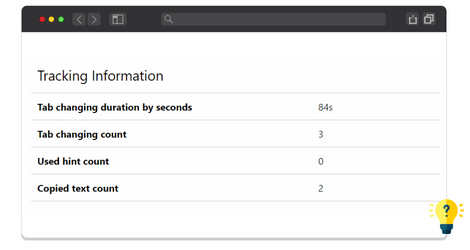
You can see how often participants switch between browser tabs, how long they stay away from the quiz, how frequently they use hints, and how many times they copy quiz content. This information can be especially useful for online exams, assessments, and training quizzes.
Why Use the Track Users Addon?
The Track Users Addon helps you understand what happens while visitors are taking your quizzes. This can be particularly valuable when creating exams, assessments, or training tests where participant behavior matters.
Use the collected data to:
- Better understand quiz-taking behavior.
- Review participant activity during assessments.
- Identify unusual activity patterns.
- Gain additional insights beyond quiz scores and answers.
- Make your online quizzes and assessments easier to monitor.
How to Use the Track Users Addon
Step 1: Install the Addon
Download the Track Users Addon ZIP file and install it through your WordPress dashboard:
Plugins → Add New → Upload Plugin
After installation, activate the addon.
Step 2: Open Quiz Results
Once the addon is activated, go to the Quiz Maker section in your WordPress dashboard and select Results.
Step 3: Select a Quiz
Choose the quiz for which you want to review user activity and click View Details.
Step 4: Select a User
You’ll see a list of participants who have completed the selected quiz. Choose the user whose activity you want to examine and open their Detailed Report.
Step 5: View Tracking Information
A detailed report will appear in a popup. Find the Tracking Information section to view the behavioral data collected by the addon.
Here you can review information such as tab changes, tab-switch duration, hint usage, and copy actions.
* This addon works with the Free, Business or Developer versions of the Quiz Maker plugin.
