Quiz Certificates
Create and customize professional quiz certificates automatically based on results, perfect for online courses, training programs, exams, and achievements.

Generate Certificates After Quiz
Generate custom certificates immediately after users finish taking the test.
Pass Score Based Certificate Generation
Award certificates only to users who achieve the required passing score.
Generate Downloadable PDF Certificates
Allow users to download their certificates in professional PDF format with just one click.
Send Certificate to User
Email certificate automatically to the users on completion of the quizzes.

Customize Your Certificate Design
- Customize Certificate Titles
- Personalized Certificate Text
- Select Certificate Frames
Create professional-looking and attractive certificates which are in alignment with your organization and quiz theme. Edit the certificate title and content, select whether the layout should be in a portrait or landscape format, add your own background image to the certificate, and pick from various certificate borders or templates.
Automatically Generate Certificates
Generate the certificates immediately once the quiz is completed. Make it easier for your users to get their certificates. You can now easily send certificates to the participants via email through the 'Send certificate to user' option or generate the certificates without the need to send them immediately.

Personalized Certificates for Every User
Create fully personalized certificates for each participant by using dynamic message variables. Automatically display important information such as user names, quiz names, scores, earned points, and completion dates directly on the certificate. This allows you to generate unique and professional certificates tailored to every user automatically.
Configure Your Email Workflow
Control the whole certificate e-mailing process easily right from the dashboard. Set up the sender's details. Customize the email subjects according to your convenience and create customized replies by utilizing the "Reply to e-mail" and "Reply to name" options. Moreover, you can even edit the body text of the e-mail and test it via the "Send email" feature.


Automatically Send Certificates & Results
This is opion will help you to automate the process of sending certificates and quiz results. You may send out certificates via email by use of the "Send certificate to user" function, automatically send out quiz results as well as interval messages. Certificates may also be sent as PDF files. You have the opportunity to send out certificates only if the users pass the quiz.
Admin Notifications & Internal Workflow
Ensure that administrators are completely updated with the help of automatic internal reporting and notification feature. You can send notifications about quizzes and reports to your administrator through the Send email to admin, send multiple reports to different users through the Additional emails option, and have automatic tables of report details. It is possible for you to send your results without scores, send interval messages to your admin, and even send certificates to your administrators through Send Certificate to admin feature.
Use Cases
See how you can use the certificates feature.
Online Course Quiz
The certificates can confirm course completion and learning achievement.
Employee Training Quiz
Certificates can validate staff training and compliance completion.
Language Proficiency Quiz
Certificates can prove user level in a specific language.
Certification Exam Quiz
Certificates can serve as official proof of passing an exam.
Skill Assessment Quiz
Certificates can highlight verified skills for career or portfolio use.
Preview, Download & Share Certificates
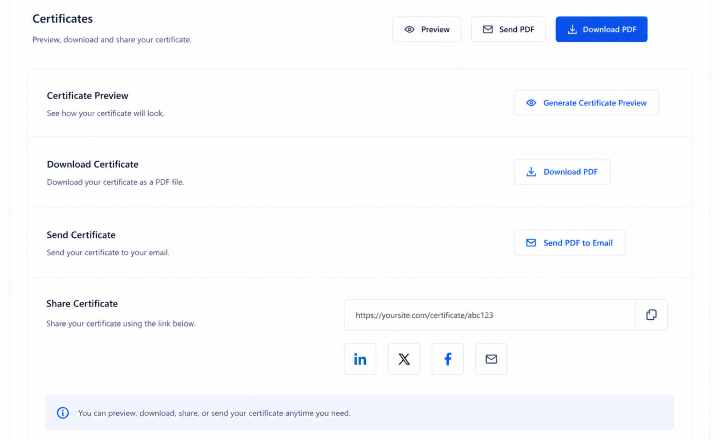
Give the users complete control and transparency about their certificates with customizable preview and sharing capabilities. You can create a preview of the certificates before sending them via Generate Certificate preview, enable users to download certificates in PDF form, and share them. The user will always have easy access to their certificates whenever needed, and the certificates may also be sent as attachments using the Send PDF feature.
How It Works
Configure Certificate Settings
Set up how the certificate looks.
Users Complete the Quiz
Users finish the quiz and their results are calculated.
Generate and Deliver Certificates
The system automatically creates and sends certificates.
Frequently Asked Questions
Can I automatically generate certificates after a quiz?
AYes, automatic generation of certificates is possible immediately following the completion of the test by the user. The system creates the certificate instantly based on the quiz settings you’ve configured, without any manual action required from the admin.
Can I show certificates only to users who pass the quiz?
You can restrict certificate generation based on a pass score. This means only users who pass the required minimum score will be able to receive a certificate, ensuring it reflects real achievement.
Can users download their certificates?
Of course, there is no difficulty in downloading the certificate in PDF format. The users can do it within a single click and can store or print it for their own use.
Can I customize the design of certificates?
Yes, you have complete control over the certificate design process. You will be able to modify everything including titles, body text, backgrounds, frames, and general layouts.
Can certificates be sent automatically by email?
Yes, certificates can be delivered automatically to users by email after completing the quiz. It makes sure that users get their certificate instantly without having to send anything manually.
Can I include user-specific data in certificates?
Certificates support dynamic data fields such as user name, quiz name, score, earned points, and completion date. This makes every certificate personalized and unique for each participant.
Can I preview certificates before sending them?
A preview of the certificate can be generated before sending or completing the quiz. This enables you to verify that all details appear correct before proceeding.
Need More Details?
Explore the Quiz Maker documentation for detailed options, settings, and best practices.
