Not every quiz question needs to be answered by reading or watching; sometimes the whole point is what someone hears. An audio quiz is a great example of this, as it attaches a sound clip to the question and lets users listen to it first and answer questions related to what they just heard. This can be a great fit for listening tests, pronunciation practice, music-related tests, or any other quiz where sound is actually connected to the quiz.
In this guide, we will cover how to build an audio quiz in WordPress using the Quiz Maker plugin.
What Is an Audio Quiz?
An audio quiz puts a sound clip next to a question, just like a video quiz puts a video next to a question, you can check out our How to Create a Video Quiz in WordPress to learn more about video quizzes. In an audio quiz, the quiz taker listens to the clip attached to that question, then answers based on what they heard.
A few common uses of audio quizzes are;
- Language listening tests. Let’s say you got an English listening exam: play a word or sentence, then ask the user to identify what was said or to select the correct spelling.
- Music trivia. Play a short video sound of a song, then ask which artist or song it’s from.
- Pronunciation practice. Play a native speaker saying a word, then ask the user to choose the matching word or transcription. Again, a great feature for exams and language tests.
- Sound identification. Play a random sound or effect, then ask what it is (useful for training or educational content).
Why Add Audio to a Quiz?
- It tests listening comprehension directly A text-based question can be answered by guessing or skimming. A question tied to an audio clip requires the user to actually listen, since the answer depends entirely on what they heard, so it’s almost impossible to skip or guess the answer correctly.
- It’s essential for language and pronunciation content. There’s no substitute for actual audio when testing whether someone can identify a spoken word, an accent, or a pronunciation difference; plain text can never test this.
- It works well for music and entertainment quizzes. “Guess the song” kind of quizzes are naturally very engaging and shareable, and they only work with real audio attached, so if you want to have quizzes that can go viral, you might want to include some audio questions in your quizzes. If you want to learn how to make your quizzes go viral, check out our how to create viral quiz in WordPress YouTube video.
How to Create an Audio Quiz With Quiz Maker
Here is an easy step-by-step guide on how to create an audio quiz with the Quiz Maker plugin. Besides this guide, you can also check out our how to create audio quiz in WordPress YouTube video to learn more.
Step 1. Install and activate the Quiz Maker Plugin
If you’re not familiar with the process, feel free to check out our Plugin Setup and Installation article out, and learn more about the setup process.
Step 2: Add your questions
Go to the quiz maker, then questions, and click Add New.
Create your questions with the answer options, and choose the correct option. Repeat this for every question you want to have on your quiz. Quiz Maker by AYS supports many types of questions, including multiple choice, true/false, open-ended, you can get to know these question types better at our all question types explained document.
So, how do we attach the audio to our question?
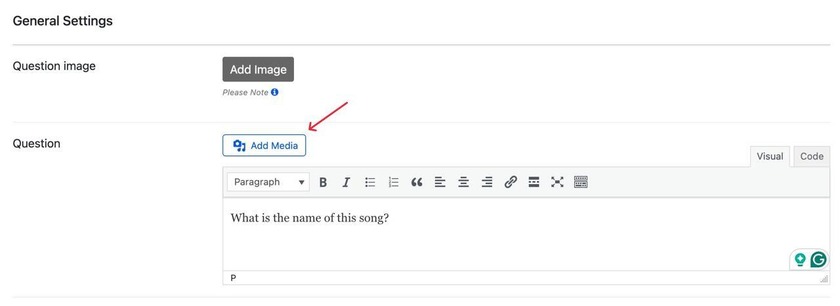
As shown in the screenshot, you should click the Add Media button
Then afterwards, you will see the following tab

Once you click Select Files, you can see all the files on your computer and choose the audio clip you want to be attached to your question.
Step 3. Adjust your question settings
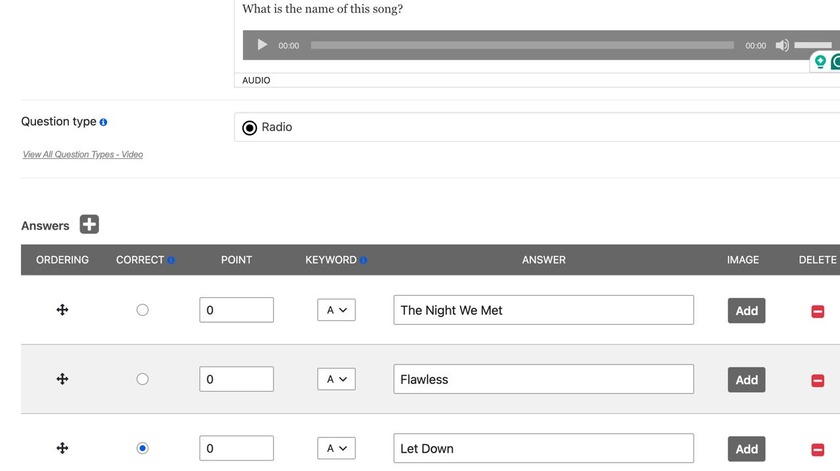
Once you’re done adding your audio, you can do your adjustments, choose the question type, put the correct answer and other settings.
Step 4. Save and publish the quiz
After you’re done adjusting the question/quiz settings, you’re all set and ready to publish your quiz on your WordPress sites.
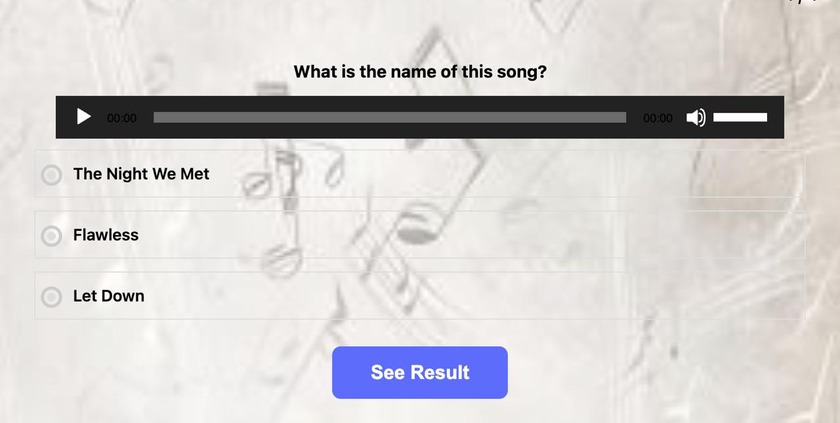
Here is what our final product will look like:
Best Practices for Audio Quizzes
- Keep clips short. A 5–15 second clip is usually enough to test the point of the question. Long clips can make the experience boring.
- Test playback on mobile. Not only in this quiz, but everytime you make a quiz, always preview it on mobile to make sure it works flawlessly both on mobile and desktop.
- Use good audio quality. Make sure your recordings are clear and understandable before uploading them. Low-quality ones can make the experience worse.
- Mix audio with other question types. 1 single quiz that is entirely made of audio questions can get boring and feel repetitive over time. Feel free to mix audio ones with regular text-based questions, or video ones.
Here are some audio quiz examples
| Use Case | Example Question |
| Language listening test | What word did you just hear? |
| Music trivia | Which artist is this song by? |
| Pronunciation practice | Select the correct spelling of the word you heard. |
| Sound identification | What sound is this? |
Why choose the Quiz Maker plugin for audio quizzes?
- The first thing worth mentioning is how easy it is to use the plugin. You can freely create whatever you want, with zero coding skills.
- Fully customizable. The plugin is fully customizable, meaning you can change the whole layout, the theme, colors, fonts, and basically everything on the quiz it matches your brand/business voice.
- Flexible scoring – You can assign different point weights to answers and questions, which is great for exams and personality quizzes.
- Certificates and personalized results: This feature is great for trainings and online classes, as it automatically sends certificates to the takers once they’re done completing the quiz. Check our How to create quiz with certificate in WordPress to learn how to use this feature.
- Lead generation and integrations – The Quiz Maker plugin lets you connect your quizzes to 15 + integrations, including Mailchimp, Google Sheets, WooCommerce, and many more.
- Paid quizzes option – Yet another great feature for teachers and online coaches. This feature lets you charge people before/after completing the quiz. If you want to learn more about this and create your first paid quiz, check out our how to create paid quiz on WordPress YouTube video.
Overall, the Quiz Maker plugin is a great choice for anyone who wants to create quizzes/exams all inside the same plugin. Some of the advanced features are in the upgraded versions of the plugin, but it’s definitely worth the money. Check our Quiz Maker pricing page to learn more.
Going back to where we started, audio quizzes are one of the simplest ways to test what people hear, and not just what they read. And if you’ve been thinking about making your quizzes more interactive, start with one audio question in your next quiz and see how your audience reacts.