In this article, we are going to pit Quiz Maker by AYS vs WPForms Quiz against each other. Quiz Maker by AYS, which is a highly popular assessment engine built specifically for deep testing and academic exams, is compared to the WPForms Quiz Addon, a known, general-purpose form builder trying its hand at interactive content.
Throughout this breakdown, we will look into exactly how these Quiz Maker vs WPForms Quiz plugins stack up against each other across several critical categories. We will examine how Quiz Maker’s dedicated exam tools, such as question banking and anti-cheating mechanisms, compare to the simplicity of WPForms.
In this WordPress quiz plugin comparison, we will also dive into how smoothly each plugin handles integrations with your existing email marketing services, followed by a side-by-side look at the specific pros and cons of each solution. Finally, we will address the numbers by contrasting Quiz Maker’s attractive, one-time lifetime license options against the often restrictive, recurring annual subscriptions required by WPForms.
Quiz Maker By AYS Overview

Quiz Maker by AYS is a highly popular WordPress assessment plugin used for certification, academic exams, and even training assessments, etc. As much as it is known for being used for these environments, it can also be used for engagement purposes only.
What makes it different from other builders is that Quiz Maker is a system that has pretty much every functionality in it. In the comparison of Quiz Maker vs WPForms Quiz, the difference in functionalities is evident, making Quiz Maker the ideal choice for those focused on structured and rigorous testing environments.
Key Features
- Advanced question bank management with categorization
- Over 10+ distinct question types (Radio, Checkbox, Dropdown, Text, and more)
- Built-in exam builder
- Advanced timers (both timer per quiz and general quiz timer)
- Strict anti-cheating mechanisms (disabled right-click, copy-paste block, etc)
- Question and answer randomization
- Conditional logic and question branching paths
- Integrations with Mailchimp, ActiveCampaign, PayPal, Stripe, and WooCommerce
1. Question Banking & Randomization
Managing a massive exam is effortless with Quiz Maker’s standalone question repository. You can create hundreds of questions, group them into categories, and configure the plugin to pull a random selection (e.g., pulling 20 random questions out of a 100-question pool) every single time a user hits start. This makes it impossible for students or test-takers to memorize answer keys.
2. Strict Anti-Cheating Protection.
If you are running high-stakes professional certifications, keeping your data secure is vital. Quiz Maker features aggressive anti-cheating tools that can completely block right-clicking, disable copy-and-paste capabilities, and prevent user selection.
3. Native Certificate Generation.
You do not need an external platform or an expensive secondary plugin to reward your users. Quiz Maker includes a built-in certificate maker. You can design custom certificates using automated template tags (like the student’s name, date, and final percentage) that automatically generate as a high-quality PDF and send to the user’s inbox the exact millisecond they hit a passing score.
4. Advanced timers
They let you truly mimic real-world testing. Quiz Maker allows you to place strict time constraints on your exams. You can create a master countdown timer for the overall quiz, or assign individual per-question timers that force the user forward when the time runs out. Combined with an interactive question navigation palette, users can skip questions, mark them for review, and track their pace seamlessly.
More features are always available, but let’s practically see how the ones above show themselves in a quiz. Quiz Maker’s demos allow you to visualize what your own final product will look like. One of those is this personality test.

This is a personality test demo will walk you through most of the features mentioned above. You’ll notice features such as random question order, dynamic scoring based on checkbox answers, and interval messages that enhance user engagement. Other features include a question counter, user count for passed quizzes, and a confirmation box to prevent accidental page exits.
Pricing
When comparing the pricing in Quiz Maker vs WPForms Quiz, it’s clear that Quiz Maker offers a more advantageous licensing model with its one-time payment option. On top of that, it also has a free version with the most used features, all for free.
Offers three primary Premium Lifetime Packages
- Business – starts at $75 (one-time payment)
- Developer – starts at $250 (one-time payment)
- Agency – starts at $450 (one-time payment)
WPForms Quiz Overview
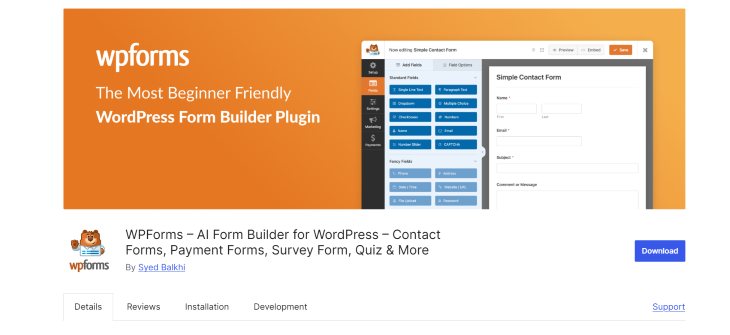
WPForms is widely recognized as one of the most popular drag-and-drop form builders for WordPress. It is less of a WordPress assessment plugin and is made to capture leads, contact requests, and simple online payments. To expand its capabilities, it offers a Quiz Maker add-on that allows users to layer basic interactive elements onto standard form structures.
Instead of operating as a dedicated, standalone exam application, the WPForms Quiz Addon works inside the standard form builder layout. It serves as a highly marketing-focused solution rather than an academic tool, aiming to quickly capture user data, score basic answers, and keep visitors engaged on a website.
Key Features
- Drag-and-drop quiz creation using the core form builder interface
- 3 primary quiz styles (Graded Quizzes, Personality Quizzes)
- Personalized “Outcomes” result screens based on user score ranges
- Custom grading scales with letter grades or percentage ranges
- Core email marketing integrations (Mailchimp, HubSpot, ActiveCampaign)
- Basic built-in countdown timers with auto-submit capabilities
- Native WPForms AI assistant for generating quick quiz templates via chat
1. Personalized Outcomes & Result Screens
What a user sees after hitting submit is fully customizable through WPForms’ “Outcomes” engine. Instead of a generic thank-you message, you can set up strict score boundaries or personality triggers. High scorers can be automatically directed to advanced educational content or a specific success page, while lower scorers can be shown custom review notes or a redirect URL.
2. Visual Results Dashboard
Tracking overall quiz performance is simplified with a built-in visual analytics suite. WPForms automatically generates clean pie charts and bar graphs mapping out how people answered each question. This makes it easy to spot which trick questions are tripping users up or filter raw submissions down to a specific subset, such as everyone who scored higher than 80%.
3. Drag-and-Drop Marketing Integrations
Because WPForms is fundamentally a contact form builder, its primary strength lies in lead generation. You can effortlessly place email opt-in checkboxes or name/email fields directly into the quiz flow. The system instantly routes captured emails straight into your preferred CRM or email marketing suite, allowing you to segment users into different lists based on their quiz results
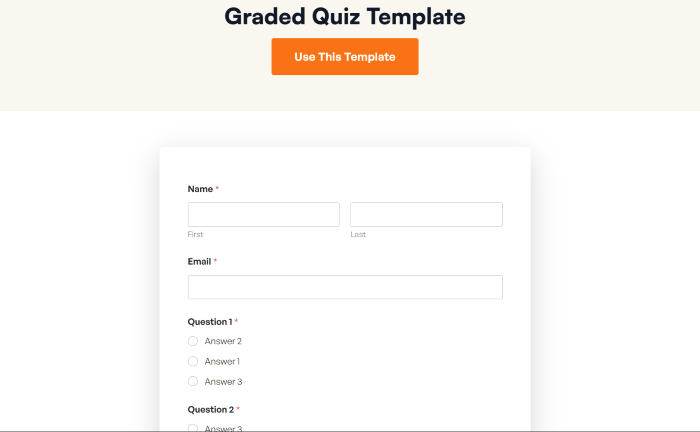
To visually access these features, you can have a look at the range of WPForms’ templates to fully understand what you might want the plugin for.
Pricing
WPForms does not offer a free or a lifetime license for its quiz builder. To gain access to it, you have to buy their Pro Plan or higher. This structure works on a recurring annual subscription model, which means you must continue paying every single year to maintain access to plugin updates, premium support, and add-on functionality. The available plans are:
- Basic – $49.50 / year
- Plus – $99.50 / year
- Pro – $199.50 / year
- Elite – $299.50 / year
Feature by Feature Comparison
When it comes to evaluating the WPForms Quiz Addon vs Quiz Maker, there are key differences in terms of pros and cons. For this WordPress quiz plugin comparison, we added a detailed breakdown of how their core capabilities match up head-to-head.
Quiz Types
The best WordPress quiz plugin should provide flexibility in the quiz range. Quiz Maker by AYS is designed for distinct educational, psychological, and conversational applications. Beyond basic testing, it can be used to create complex personality quizzes like 16 personality tests, IQ tests, diagnostic psychology assessments, password-protected examinations, conversational/interactive styles, and language placement configurations (like TOEFL practice mock exams), and more.
WPForms Quiz Addon, in this regard, is limited. It has three primary quiz archetypes: standard Graded Quizzes, basic Personality Quizzes, and Weighted Calculation Quizzes. While these options are excellent for marketing engagements and interactive web content, they lack the structural diversity needed for specialized psychological testing or advanced academic formatting. And sometimes those designed for engagement specifically may lack some necessary features for it.
Question Banks & Randomization
Quiz Maker by AYS houses advanced question types. You can build huge, categorized question banks and set the plugin to dynamically pull a specific random batch.
WPForms Quiz does not have a standalone question banking engine. In this case, questions must be explicitly placed and arranged linearly inside that specific form file, meaning every user receives the exact same questions in the exact same sequence.
Third-Party Integrations & Ecosystem
Quiz Maker integration is a solid, focused selection of tools for supporting exam administration and monetized testing. It connects directly with core email marketing tools (like Mailchimp and ActiveCampaign). You can also monetize your test, quiz, or exam through PayPal, Stripe, and WooCommerce to sell access to their premium courses or certificates.
WPForms Quiz Addon has a massive integration ecosystem. It features deep, native connections to extensive CRM platforms (such as Salesforce, HubSpot, and Zoho), a wide array of email marketing software, and versatile payment processors (including Stripe, PayPal, Square, and Authorize.Net), alongside open Zapier support to connect your quiz data to thousands of external web apps.
Advanced Timers
Quiz Maker by AYS offers granular timing parameters. You can deploy a master countdown timer for the entire exam or set independent countdown timers for individual questions to force pace test-takers.
WPForms Quiz gives you basic page-level or form-level timers via its general add-on framework. But it does not support per-question countdowns or advanced layout formatting for interactive pacing, regardless of whether it’s a serious testing environment or not.
Reporting, Analytics, and Student Tracking
For reporting and analytics, Quiz Maker delivers a comprehensive academic grading backend designed for in-depth evaluation. It records exact user data, including individual question responses, time spent per question, and pass/fail ratios.
WPForms Quiz focuses on marketing performance analytics. It has a built-in results dashboard that translates form submissions into clean pie charts and bar graphs that display overall trend data.
Feature Comparison
| Feature Category | Quiz Maker by AYS | WPForms Quiz Addon |
| Primary Use Case | Academic Exams, Certifications & Training | Lead Gen, General Forms & Simple Quizzes |
| Question Bank Pool | Yes (Advanced, category-based) | No (Questions are locked to the form) |
| Randomization | Yes (Questions and choices) | No |
| Anti-Cheating Options | Yes (Copy block, tab-switch lockouts) | No |
| Native PDF Certificates | Yes (Built-in template builder) | No (Requires third-party tools) |
| Quiz-Wide & Per-Question Timers | Yes | Quiz-wide only |
| Pricing Model | Budget-friendly lifetime licenses | Costly annual subscriptions only |
Pricing Comparison Breakdown
To help you choose the right financial fit for your project, let’s look at exactly how each plugin structures its licensing, plans, and long-term costs individually.
Quiz Maker by AYS
Pricing in Quiz Maker is a standout in the WordPress ecosystem because it prioritizes one-time payments and lifetime licenses. Once you purchase a package, you own the software forever and receive perpetual updates and support without any recurring annual fees.

| Plan Name | Site Allowance | Price (One-Time) | Key Package Features Included |
| Business | 5 Sites | $75 | 12 months support/updates, unlimited quizzes, randomization, question banking, flashcards, and basic reporting. |
| Developer | Unlimited Sites | $250 | Lifetime support/updates, file upload questions, certificate generation, Mailchimp, Zapier, PayPal, and Stripe. |
| Agency | Unlimited Sites | $450 | Lifetime support/updates, +60 premium features, advanced integrations (WooCommerce, Razorpay). |
WPForms (Quiz Addon)
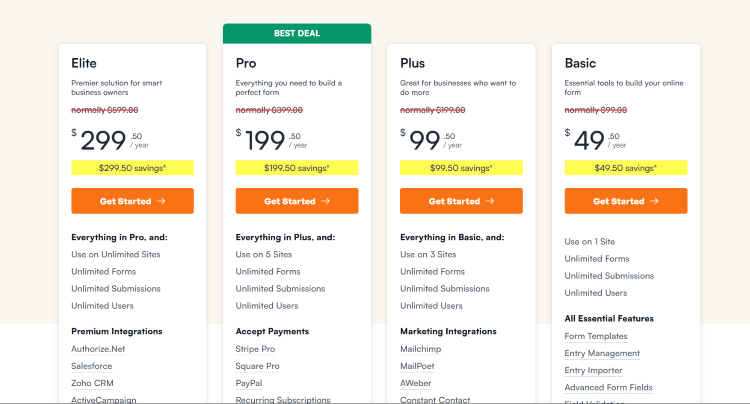
WPForms’ pricing does not offer a standalone quiz plugin, nor does it offer lifetime licenses. To gain access to their Quiz and Survey Addon, you are required to purchase their Pro Plan or higher. This operates strictly on a recurring annual subscription model, meaning you must continue paying every year to maintain your access to plugin updates, premium support, and addon functionality.
| Plan Name | License Type | Site Allowance | Standard Renewal Price (Annual) | Quiz Addon Included? |
| Basic | Annual Subscription | 1 Site | $99.00 / year | No |
| Plus | Annual Subscription | 3 Sites | $199.00 / year | No |
| Pro (Minimum) | Annual Subscription | 5 Sites | $399.00 / year | Yes |
| Elite | Annual Subscription | Unlimited Sites | $599.00 / year | Yes |
Pros and Cons Comparison
To give you a completely transparent look at how these two plugins perform in the real world, let’s break down the unique strengths and weaknesses of each option in our WPForms quiz review.
Pros for Quiz Maker by AYS
- Lifetime Value – The one-time fee structure means you never have to worry about annual subscriptions or sudden price changes.
- Advanced Academic Integrity – Built-in features like copy-paste blocking, window-switch detection, and right-click disabling make it highly secure for actual testing and certification.
- Huge Testing Flexibility – Supports over 10 different question types (including matching and fill-in-the-blanks) and a massive variety of specialized quiz types like IQ, TOEFL practice, and psychology tests.
- Dynamic Questions – The question banking system allows you to build a single huge catalog and serve completely randomized questions to every user.
- Native Document Delivery – Generates and emails beautiful, automated PDF certificates upon quiz completion without requiring third-party tools.
Cons for Quiz Maker by AYS
- Learning Curve –Because it is packed with complex settings, the user interface can feel slightly overwhelming to beginners at first glance.
- Overkill for Simple Forms – If you only need a quick 3-question lead generation form, this full examination engine offers more functionality than necessary.
Pros for WPForms (Quiz Addon)
- Massive Integration Library – It integrates seamlessly with an extensive array of enterprise CRMs, advanced email marketing platforms, and multiple payment gateways.
- Beautiful Marketing Dashboards – Excellent at translating high-level lead capture data into clean, visual graphs and charts for marketing analysis.
- Versatile Core Tool – From this perspective, this turns into a quiz plugin vs a form plugin. If your site needs contact forms, request-a-quote forms, and payment forms alongside simple quizzes, it handles all of them in one single plugin.
- AI Quizzes – The fastest way to integrate a quiz on your website is to use the AI tool that they provide. Just keep in mind that it will lack personalization, but great for simple forms.
Cons for WPForms (Quiz Addon)
- Expensive Recurring Cost – There is no lifetime package, and you are forced to purchase the Pro tier at a minimum of $399/year standard pricing just to unlock basic quiz functionality.
- No Anti-Cheating or Hard Security – It lacks right-click blocks, window lockouts, or copy-paste restrictions, making it entirely unsuitable for formal academic testing.
- Lacks Question Randomization – You cannot create question banks; all questions must be manually placed in a fixed, linear order for every user.
To see exactly how these platforms communicate with your existing tech stack, here is a direct breakdown of supported native integrations.
| Integration Category | Quiz Maker by AYS | WPForms Quiz Addon |
| Email Marketing (Mailchimp, ActiveCampaign, Klaviyo, Brevo) | Yes | Yes |
| CRMs (HubSpot, Salesforce, Zoho) | No | Yes |
| Core Payments (PayPal, Stripe) | Yes | Yes |
| Advanced Payments (Razorpay) | Yes | No |
| E-Commerce (WooCommerce) | Yes | Yes |
| Automation (Zapier) | Yes | Yes |
| AI Features (ChatGPT, Gemini, DeepSeek) | Yes | No |
| Gamification (GamiPress, MyCred) | Yes | No |
| Page Builders (Elementor, Divi, Gutenberg) | Yes | Yes |
Pros and Cons: Quick Summary
Here’s a skimable table to glance at the final strengths and weaknesses in Quiz Maker vs WPForms quiz.
| Plugin | Key Strengths (Pros) | Major Limitations (Cons) |
| Quiz Maker by AYS | • One-time lifetime pricing• Powerful anti-cheating & security• Dynamic question banks & randomization• Native PDF certificate generation• Massive variety of quiz/question types | • Steeper initial learning curve• UI can feel complex for basic needs• Might be too much for simple contact forms |
| WPForms Quiz Addon | • Extremely easy drag-and-drop UI• Huge library of enterprise CRMs & integrations• Beautiful visual marketing charts | • High annual recurring renewal fees ($399/yr)• No anti-cheating tools or test security• No question banking or randomization pool |
Conclusion
This WordPress quiz plugin comparison of WPForms Quiz Addon vs Quiz Maker shows that, yet again, each tool has its strengths and weaknesses.
If your focus is education, formal training, or robust testing, Quiz Maker by AYS is the best WordPress quiz plugin between the two. It is a dedicated examination engine built for academic integrity, offering question banking, anti-cheating protocols, and native PDF certificate generation. Best of all, its standard one-time fee of $75 for the Business tier provides permanent ownership and frees you from ongoing subscription fees.
WPForms quiz review showed how beginner-friendly a marketing tool this app is. If you already use WPForms Pro to manage your site’s contact pipelines or payment forms, the quiz add-on is a great bonus feature. However, purchasing it strictly for quizzes makes little financial sense. At a standard renewal rate of $399 per year, you are paying a heavy recurring premium for a general form builder that lacks essential testing features like question randomization and secure test-locking tools.