Online quizzes and tests help people see how much they know, track their progress, and let teachers check learning without needing everyone in one room. But online quizzes and tests face a problem: they must make sure that every person takes the test honestly. And to be real, this is such a difficult thing to track, because when a test taker sees a question they don’t know the answer to, they can basically copy the question and paste it into Google or an AI chatbot and get the answer in seconds. Fortunately, Quiz Maker has a few features that will help teachers and online trainers reduce cheating.
In this guide, we’ll explore some of these ways to reduce cheating in WordPress quizzes and online tests, using the Quiz Maker plugin.

Why Is Cheating a Challenge in Online Quizzes?
The reason may sound obvious, but it’s worth spelling out why online tests are harder to keep an eye on than classroom ones.
In a classroom, the teacher is right there. They can see what students are doing, set up the room however they like, and make sure everyone plays by the same rules. Online, none of that exists. People take the test from wherever they happen to be, on their own laptop or phone, and that makes it a lot easier to get help from outside.
Cheating on online quizzes usually takes a few familiar forms. The simplest is opening another tab and googling the question mid-test. Some people skip the searching and get the answers from someone else, whether that’s a classmate who sends screenshots, a group chat that picks apart the questions, or a friend who shares a finished test. Others just retake the quiz a few times until they’ve memorized what’s marked right. A few get a person to sit beside them and help. And lately the easiest route is pasting the question into a chatbot and copying whatever it says.
Here Are a Few Practical Ways to Reduce Cheating in WordPress Quizzes and Online Tests
1. Randomize Questions and Answer Option I
If everyone gets the same quiz in the same order, cheating becomes easier. The first person to finish can text the questions and answers to a friend who hasn’t started yet, and that’s about all it takes.
Randomizing breaks that. Each person sees the questions in a different order, and if you shuffle the answer choices too, “the answer is C” stops being useful information.
You can go a step further with a question bank. Say you’ve written 30 questions but only need 15 answered. Rather than picking one set of 15 for everybody, let the quiz draw 15 at random for each attempt. Two people sitting the same quiz may end up with quite different questions, so passing around a full answer list gets a lot less practical.
How to do it in WordPress:
With the Quiz Maker plugin, you can organize questions in a question bank and use random question selection to create different quiz attempts. You can also randomize the order of questions and answer options through the available quiz settings.
For this, you will need to go to the Quiz Settings section
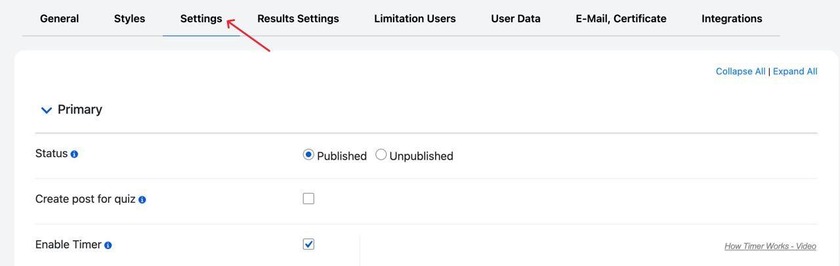
Scroll down a bit, and you will see the following settings
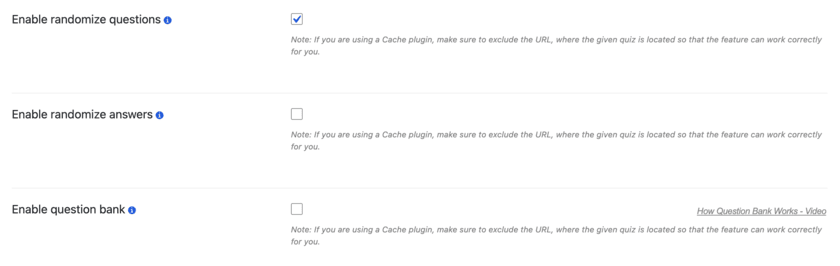
- Enable randomize questions means to show the questions in a random order, exactly what we need.
- Enable randomize answers means to show the answers in a random order.
- Enable question bank means to take a specific number of questions from the quiz randomly. For example, you can choose 20 questions from 50 randomly. Every time it will take different questions from the pool.
2. Set a Time Limit for Your Quiz
Unlimited time makes cheating easy. Someone can google every question, ask a friend, or paste it into a chatbot, and nothing can stop them. A timer can fix that. If people know the clock is running, they can’t afford to spend five minutes hunting down a single answer.
That said, you don’t want the quiz to feel like a race. Give people enough time to read each question, think it over, and finish without panicking. For a 20-question multiple-choice quiz, 20 to 30 minutes is usually fair, depending on how hard the questions are.
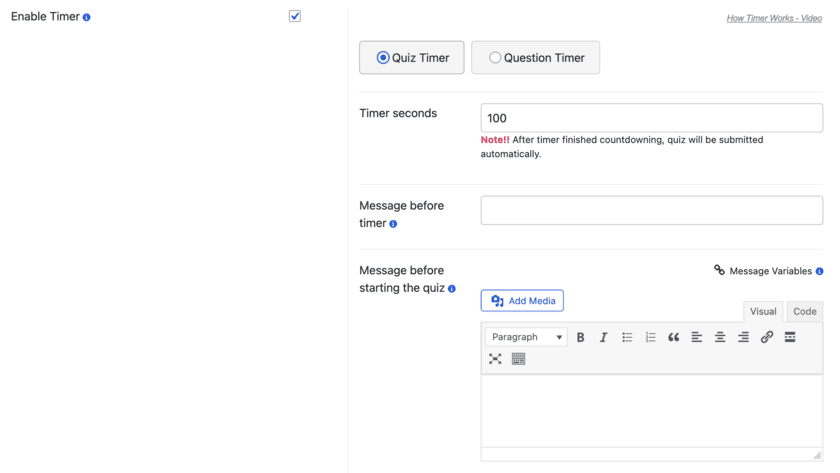
There are two ways to do this. You can set one timer for the whole quiz and let people decide how to spend their time. Or you can give every question its own countdown, so when it hits zero, they’re moved along. The per-question timer works best for quick knowledge checks, since there’s no time to look anything up. What you see is what people remember.
How to do it in WordPress:
To enable the timer, stay in the quiz’s Settings tab of the quiz. After a bit of scrolling, we will see this tab, where you can set the timer type, the duration in seconds, and even add messages before/after starting the quiz.
3. Limit the Number of Attempts
If people can retake a quiz as many times as they like, the score stops telling you much. Someone who retakes it five or ten times doesn’t need to know the material. They just need to remember which answers got marked right.
Capping the number of attempts fixes that, and how tight the cap should be depends on what the quiz is for. A practice quiz can allow plenty of tries, because the whole point is for people to review, get things wrong, and improve. If you want a fair read on what someone knows, one or two attempts is enough. For a final exam that counts toward a formal result, one attempt is usually the safest choice.
Just don’t overdo it. Strict limits on a practice quiz can scare people off, and then they stop learning from it. So before you pick a number, decide whether the quiz is there to help people learn or to grade them.
How to do it in WordPress:
For this, you will have to go to the Limitation Users section of the quiz.
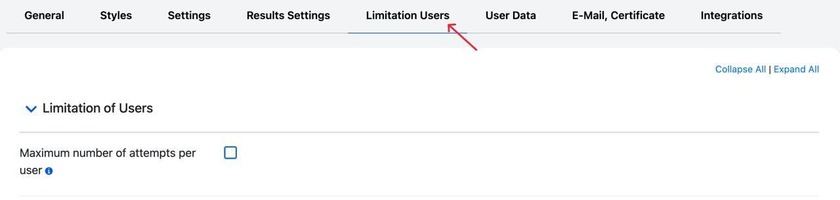
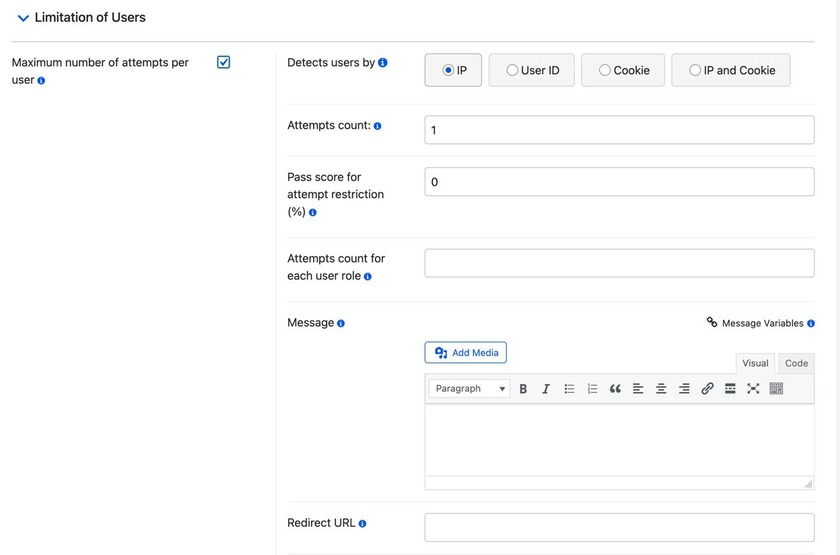
So once you enable the setting, you will see this settings tab open, where you can configure the attempt limits and limit users by their IP, User ID, Cookies, or IP and Cookie.
4. Enable Copy Protection
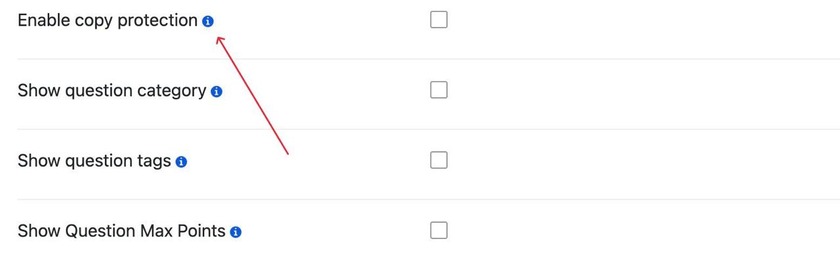
This is probably my favorite one, but also the one students dislike most, because this feature disables the copy functionality, meaning that a student can’t copy the question and paste it somewhere else. To do this, we have to find the Enable Copy Protection setting in the quiz settings section and enable it.
5. Use Different Question Types
A quiz made entirely of multiple-choice questions is the easiest kind to cheat on. Anyone can Google the question, spot the right option, or pass the answers along to a friend.
But mixing up the question types makes that harder, and it shows you more about what students understand. A good quiz can use a bit of everything. Multiple choice still works for the basics, where people pick one answer or several. True/false is fine for checking whether someone can spot a wrong statement. Fill-in-the-blank asks people to recall the missing word themselves instead of recognizing it in a list. Matching lets you test whether they can connect terms with their definitions. And open-ended questions make people explain things in their own words, which is the hardest type to copy from somewhere else. The Quiz Maker plugin offers 10+ question types; learn more in our All Question Types Explained guide.
As a teacher, it’s very difficult to accept that you can never make cheating impossible, but that’s the sad reality we live in: when students just want to get a good grade, I mean, I can understand them too; with Google, AI chatbots, and so many other tools just a click away, finding an answer has never been easier.
But that doesn’t mean there’s nothing you can do about it. As a teacher, your goal isn’t necessarily to create a quiz that nobody can cheat on, but to make sure that getting an answer honestly is easier than trying to find a shortcut.
That’s where the Quiz Maker features we discussed can help you. Randomizing questions, setting timers, limiting attempts, and enabling copy protection won’t solve everything, but they can make a pretty big difference.