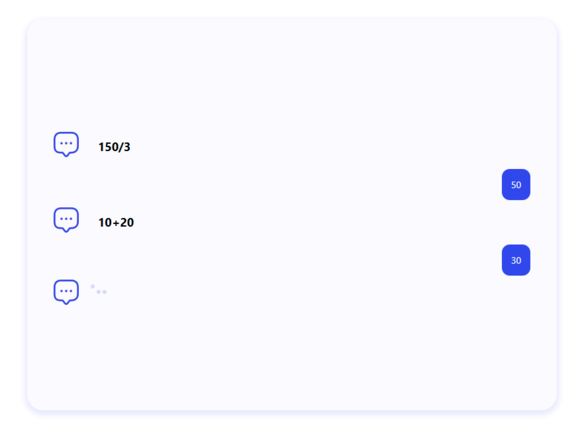
The Chat Quiz Addon for Quiz Maker by AYS plugin transforms that experience by presenting questions in a conversational chat interface. Instead of a standard quiz layout, participants interact with questions as if they were chatting with a real person. This creates a more engaging and modern experience that keeps users focused until the end of the quiz.
How to Use the Chat Quiz Addon
Step 1: Install Quiz Maker and Chat Quiz Addon
Make sure the Pro version of the Quiz Maker plugin is installed and activated on your WordPress website, and the Chat Quiz Addon as well.
Step 2: Open your quiz settings
Navigate to Quizzes, select the quiz you want to edit, and open the Settings tab.
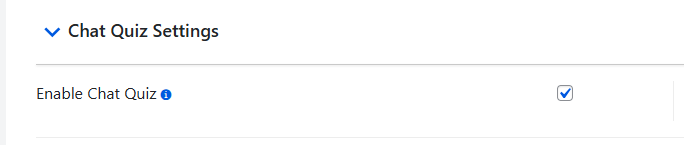
Step 3: Enable Chat Quiz mode
Locate the Enable Chat Quiz option and switch it on.
Step 4: Save the quiz
Save your changes to apply the new chat layout.
Your quiz will now be displayed in a conversational format, allowing users to answer questions through an intuitive chat interface.
One thing you must know is that the Chat Quiz Addon is not compatible with the matching question type.
Why Choose the Chat Quiz Addon?
The Chat Quiz Addon offers a new option to present quizzes. It’s a great choice if you want to:
- Increase user engagement.
- Make quizzes feel more interactive.
- Improve the overall quiz-taking experience.
- Give your website a modern look.
- Build quizzes that are both enjoyable and easy to complete.
* This addon works with the Business or Developer versions and is included in the Agency package of the Quiz Maker plugin.
