If you’ve ever created an online quiz, you’ve probably faced this problem: participants memorize the questions and answers, and make it less challenging and difficult.
In that case, the solution would be in Quiz Maker by AYS, which will enable you to shuffle answers and randomize the order of your questions in a way that each participant will have an original and challenging quiz.
Shuffling questions and answers is the easiest way to make your quizzes more interesting and interactive and avoid memorization, as well as create a fair environment for your quiz takers.
Randomization is particularly useful for IQ tests, exams, educational assessments, and training quizzes where challenging and keeping fairness is essential.
In this article we will show you how to create randomized quiz questions and answers using Quiz Maker by AYS and explore other useful options to customize your quizzes.
What Are Randomized Questions and Answers?
Randomized quiz questions and answers are quiz functionalities that ensure uniqueness during every quiz.
In such a way, rather than having the questions and possible answer options appear in the same order for each individual taking the test, the quiz system randomly reorganizes them.
There are mainly two types of randomization options in Quiz Maker by AYS that can be used in online quizzes/exams:
Randomized Quiz Questions
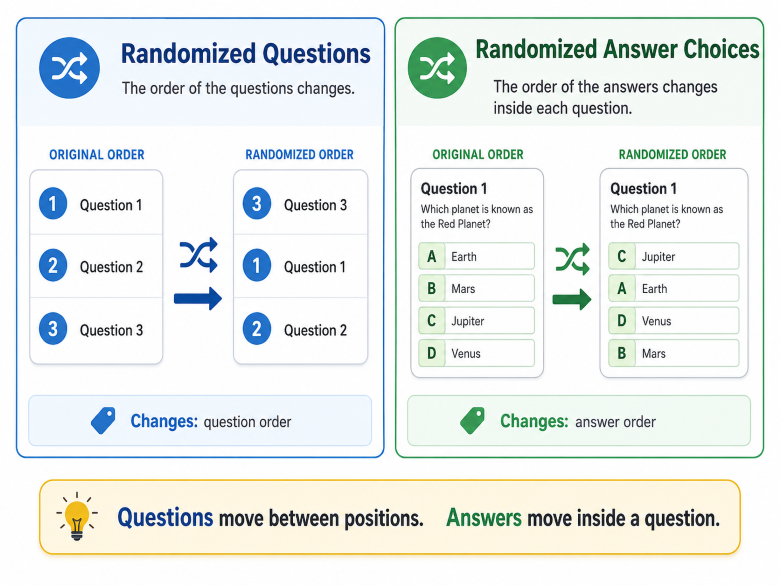
Question randomization changes the order in which questions appear. For example if your quiz contains 20 questions, one participant may see Question A first and Question B fifth, while another participant may see them in a different order.
Quiz question randomization helps prevent quiz takers from memorizing the sequence of questions or sharing answers with others, which makes quizzes more secure.
Randomized Answer Choices
Answer randomization changes the order of the answer options within each question. For example the correct answer might appear as option A for one participant and option C for another.
Answer randomization only rearranges the answer choices and keeps the question in the same position.
Benefits of Randomizing Quiz Questions
Randomized quiz questions and answer choices offer various positive outcomes for both quiz creators and quiz takers. Here are some of the main benefits:
- Reduce cheating opportunities – When every participant receives questions and answer choices in a different order it becomes much more difficult to share answers or rely on memorization. This is especially important for online exams, certification tests and educational assessments where fairness really matters.
- Get more accurate assessment results – Randomization helps measure participants’ real knowledge rather than their ability to memorize question sequences or answer positions. As a result, quiz creators can gain a more reliable understanding of each participant’s performance.
- Create a unique experience for every attempt – Displaying questions and answer choices in a different order keeps quizzes fresh and engaging. Even when participants take the same quiz multiple times, each attempt can feel different and more interactive.
- Save time for educators and quiz creators – Instead of creating multiple versions of the same quiz manually, educators and trainers can use randomization to generate unique quiz experiences automatically in order to prevent quiz cheating. This saves time while still maintaining the quality and effectiveness of the assessment.
When Should You Use Randomized Quizzes
Randomization isn’t just a nice-to-have feature. It’s become essential across a wide range of industries and use cases.
Randomized questions and answers can be useful in many situations, including:
- Educational exams and assessments, where reducing cheating opportunities is more than important.
- Employee training quizzes, to make sure that each assessment attempt remains challenging for them.
- Certification and compliance tests, where fairness and security are essential.
- Online courses and e-learning platforms, to encourage genuine learning rather than memorization.
- Practice tests and mock exams, to provide a different experience on every attempt.
- Trivia and entertainment quizzes, to keep quizzes fun, dynamic, and engaging.
How to Make a Quiz with Randomized Questions and Answers Using WordPress (A Step-by-Step Guide)
Among the simplest ways to make a quiz in which questions and answers are randomized is the use of Quiz Maker by AYS plugin. It’s one of the most popular quiz plugins for WordPress, and it comes with a built-in option that lets you shuffle both questions and answers every time someone takes the quiz. This means no two attempts will look exactly the same. Best of all, you don’t need any coding knowledge to set it up. Let’s go through the process step by step.
Step 1: Install and Activate the Quiz Maker Plugin
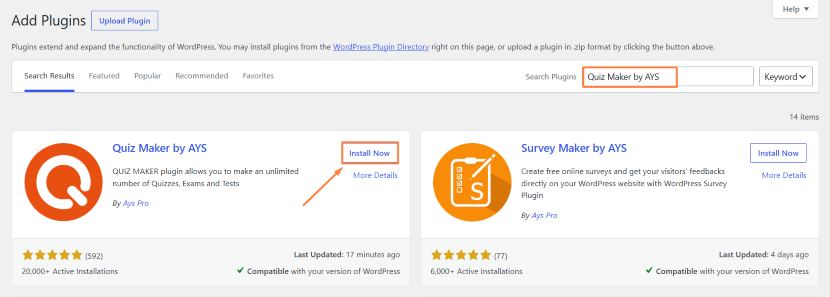
Log into your WordPress dashboard, go to Plugins → Add New, type “Quiz Maker by AYS” into the search box, hit Install Now, and then Activate.
Step 2: Create Your Quiz Questions
After activation, a new Quiz Maker menu will appear in your sidebar.
Go to Questions → Add New and start adding your quiz questions and answer options. Quiz Maker by AYS supports a variety of question types, so you can mix things up instead of relying on the same format for every question.
Step 3: Create a New Quiz
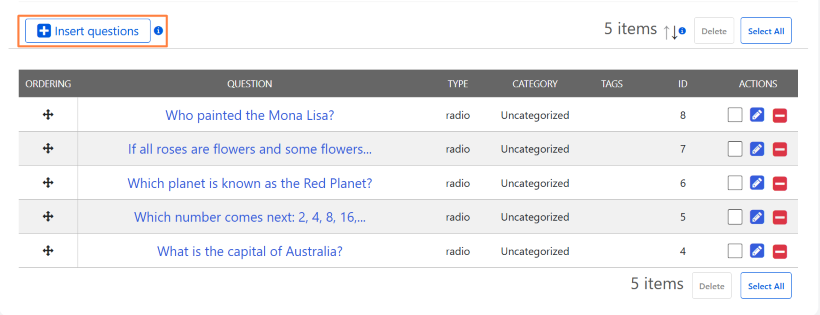
Go to Quizzes → Add New, give your quiz a title, and use the Insert Questions button to pull in the questions you just created.
Step 4: Enable Randomized Questions and Answers
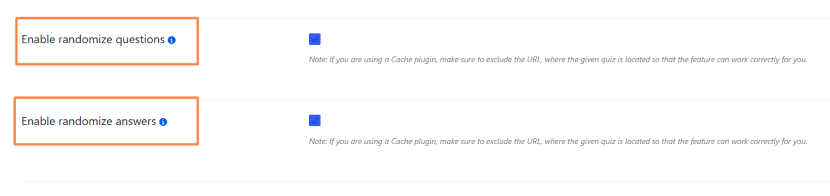
Open your quiz’s Settings tab. There you’ll find two important options:
- Enable randomize questions – shuffles the order questions appear in
- Enable randomize answers – shuffles the order of answer choices for each question
Turn both on to make sure every quiz attempt looks different.
Step 5: Publish and Test Your Quiz
Copy the quiz shortcode, and paste it into any page or post. Preview it a couple of times to confirm the order changes on each attempt.
Ways to Strengthen Your Randomized Quizzes
Randomized quiz questions and answers work well on their own, but combining them with a few additional Quiz Maker by AYS features can make your quizzes even more effective. Here are some ways to get more out of a random quiz generator:
Explore the full feature set – Beyond basic shuffling, WordPress Quiz Maker by AYS plugin offers a wide range of tools that work alongside quiz question randomization, from scoring options to custom result pages. Checking the full Quiz Maker by AYS features list can help you decide what to add next.
Add a time limit for extra structure – Randomized online tests can feel safer when you add a time limit. This is especially useful for online exam random questions used in certification or training where managing the time matters as much as preventing quiz cheating. Our guide on how to create an online exam with a timer in WordPress walks through the setup.
Combine shuffle settings with scoring rules – When you pair shuffle quiz answers with custom scoring or pass/fail rules, randomization does more than just change the order of things. It also helps you check each participant’s real performance.
Bonus: Use a Question Bank for Even More Variation
In case you are looking for more randomization options, Quiz Maker by AYS also provides an interesting feature called Question Bank that operates differently compared to question and answer randomization.
Question bank differs from other randomization options in the way it does not provide the possibility to rearrange the questions but rather allows choosing them from a pool of questions you added to your quiz.
For instance, you have created a quiz consisting of 50 questions. You decide to use question bank in your quiz and limit the number of questions that participants should complete to 10. It means that every time participants take a quiz, 10 questions out of the total number of questions you included will be chosen randomly.
So, participants will not see not only the questions in a different order but even the questions will differ from participant to participant. When used together with answer randomization, question bank feature will ensure that no two participants will have the same quiz experience, which will be particularly helpful if you need to avoid cheating in exams or certification tests.
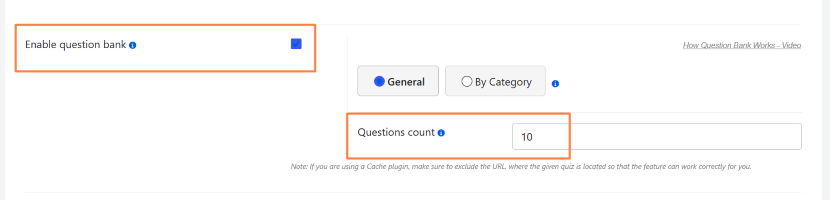
You can also check our video guide on How to Create Question Bank for Quiz in WordPress.
Conclusion
Question and answer randomization is probably the easiest way to make your quizzes fair, secure and interesting. As we mentioned above, the randomization of questions means that the order of your questions will change, and the randomization of answers will shuffle the answer options in each question.
No matter what kind of quiz you want to create – be it educational exam, employee assessment test, driving test, certification test, or a simple fun trivia quiz for your audience, randomization will help you get more accurate results and provide each quiz-taker with an entirely unique experience even if he or she participates in the quiz several times.
As you already witnessed, with Quiz Maker by AYS, you only need a couple of clicks to turn on question and answer randomization without any coding skills. All you need to do is create your questions and quiz, go to Settings tab, turn on both “Enable randomize questions” and “Enable randomize answers” options and publish your quiz with shortcode.
Download Quiz Maker by AYS for free and try question and answer randomization now on one of your quizzes!
FAQs
Yes, “Enable randomize questions” AND “Enable randomize answers” are different options that you can choose to use separately or together.
No, this feature just shuffles the order, the content is always the same.
New one every time, because randomization occurs every time during every attempt, no matter whether the user takes the quiz for the second time or the hundredth one.
Yes. If you’re pulling a random set of questions from a larger question bank, you can also enable answer randomization on top of it. This way, participants get both a different set of questions and a different order for answers.