Timed exams add a sense of urgency, greater engagement, and level the playing field for all participants. Creating a professional timed exam doesn’t have to be complicated; you just need an easy-to-implement WordPress plugin like Quiz Maker by AYS.
Whether you are writing an exam, setting a knowledge quiz for colleagues to level up your AI understanding, or using a personality quiz during a recruitment process, driving real results matters. You want your measurement to be fair, accurate, and even fun.
From when and who should have a timed quiz to a detailed step-by-step guide on how to create an online exam with a timer, and the most important features to consider when choosing a pro and free plan, here is how to create an engaging, fun, and professional online exam with a timer so that you can:
- Set timers per question or for the whole exam
- Customise your questions and formats for an engaging user journey
- Generate certificates
- Create a quiz countdown
- Integrate with CMS platforms seamlessly to share results or motivate people further.
When Do You Actually Need a Timed Exam?
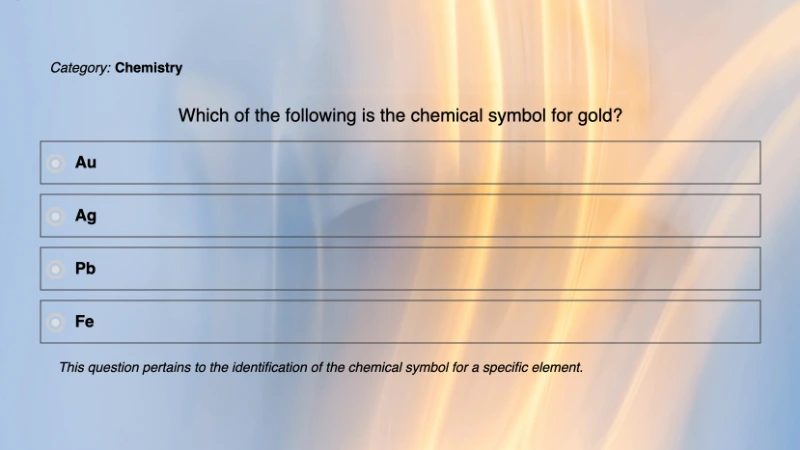
A timer-based quiz is a type of quiz where users are given a set amount of time to answer each question. These timed online exams have multiple benefits for schools, universities, and creators. All educators will benefit from using a timed exam or assessment. They engage users in critical and fast thinking while creating a fair and controlled environment. Plus, a timed challenge can boost morale and dopamine, especially when a user achieves good results or sees improvement over time.
Who Needs Timed Assessments, Quizzes, or Exams on WordPress?
Common industries and professionals who need an online assessment for WordPress that is timed include:
- Schools, Universities and Online Learning Platforms: A timer replicates formal exam conditions and ensures results reflect genuine knowledge, not just research.
- Employee Training and Compliance: A timed assessment makes employees actually engage with the material.
- Recruitment Assessments: A timed skills test ensures every candidate is evaluated under the same conditions, so your shortlist is based on genuine capability.
Why Do They Need Them?
Online exams and assessments on WordPress have multiple benefits. Mostly, they offer a fair online space to test their students. Plus, they can seamlessly retrieve results, saving them time, too. They can offer educators:
- Better time management: Automated timers, scheduling, and result collection save time.
- Fair assessment conditions: Every participant faces the same questions, the same timer, and the same environment.
- Reduced chances of cheating: Randomised questions and timers make it far harder to look up or share answers.
What Makes Exams Feel Professional?
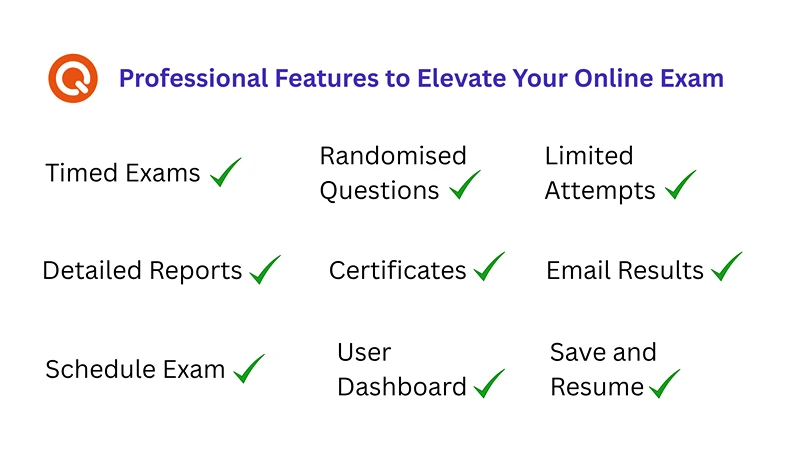
A professional online exam isn’t just about the questions; it’s about the entire experience. Here are the core features that make an assessment feel credible:
Timed Exams: Keep assessments fair and on schedule for every participant
Randomised Questions: Serve questions in a different order each time, making it harder to share answers
Limited Attempts: Set attempt limits per student so results reflect genuine performance
Detailed Reports: Track each participant’s performance and gain valuable insights at a glance
Certificates: Automatically issue certificates after exams so participants can showcase their achievements
Email Results: Deliver results directly to participants’ inboxes the moment they submit
Schedule Exam: Set specific dates and times for when your exam goes live and expires
User Dashboard: Give users a centralised place to view exams, track progress, and access results
Save and Resume: Let participants save their progress and continue later without losing their answers
Learn more about creating a professional online exam in this video.
How Do Users Experience Online Exams?
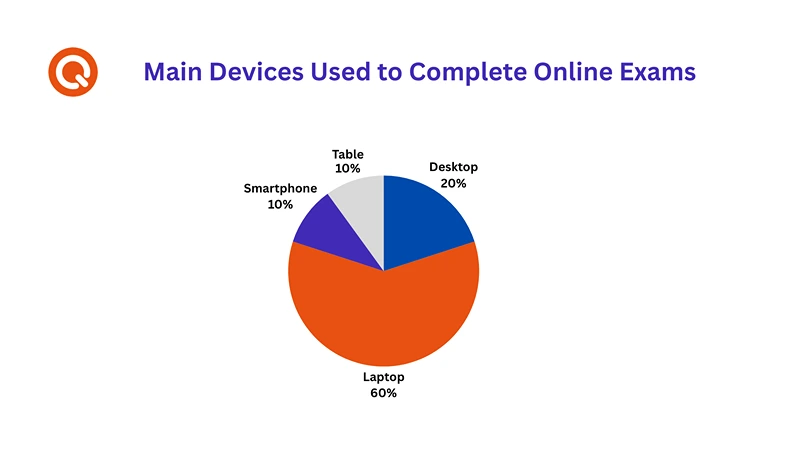
Most people use a desktop or laptop to take a serious exam. However, for more informal and engaging quizzes or assessments, they may use a mobile or tablet.
How to Create a Timed Online Exam with a Timer (Free Version)
Use one of the most trusted WordPress exam plugins, Quiz Maker by AYS. The free version includes two essential features: a timer and a countdown, both key to creating a fair and engaging online assessment. Once the timer runs out, the exam is submitted automatically, even if the participant hasn’t answered every question. This automatically limits the exam duration, ensuring a fair and consistent experience for every participant.
Here is how to create a free online exam with a timer in WordPress:
Step 1: Install the Plugin
- Go to your WordPress dashboard
- Navigate to Plugins > Add New and search for “Quiz Maker”
- Click Install Now, then Activate
Step 2: Create Your Questions
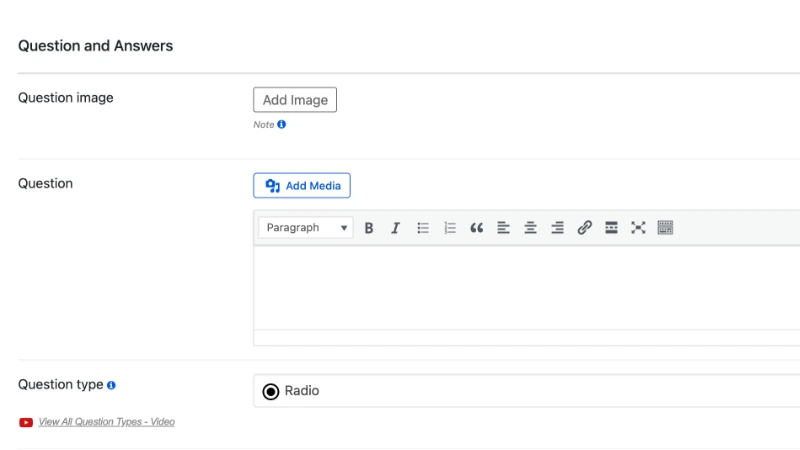
- In the left menu, click on Quiz Maker > Questions
- Click Add New Question
- Choose your question type (multiple choice, true/false, text, and more)
- Add your question text, an optional image, and assign points
- Save and close when done — repeat for each question
Step 3: Create Your Quiz
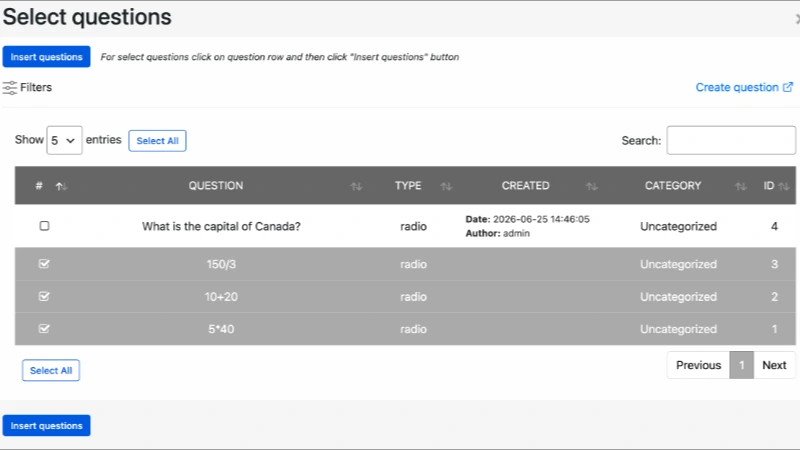
- Navigate to Quiz Maker > Quizzes
- Click Add New or edit an existing quiz
- Add your questions from the question list and arrange them in your preferred order
Step 4: Set Your Timer
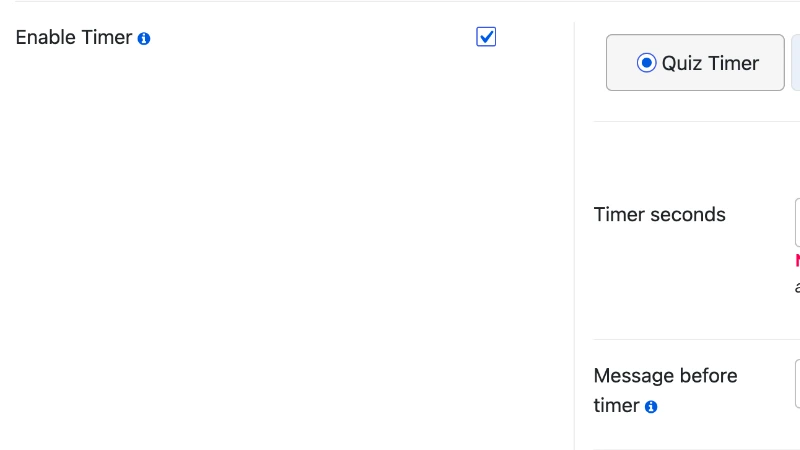
- Go to the Settings tab within your quiz
- Scroll down to the Enable Timer option and tick the checkbox
- Input your preferred time value
- Add an optional message to display before the exam starts and after the timer ends — for example, “Your time is up. Your exam has been submitted automatically.”
- Tick the Show Timer on Page checkbox so participants can see the countdown as they work
- Save your changes
Step 5: Publish and Embed Your Exam
- Once you are happy with your settings, publish your quiz
- Copy the shortcode and paste it into any WordPress page or post where you want the exam to appear
Try Free Quiz Maker by AYS Now.
When Should You Upgrade?

If you are a starting educator, the free version will work well for you. But if you want to create more engaging, professional exams, upgrading is worth considering.
Your online assessment should reflect your quality as a teacher or leader in your niche. By upgrading, you can offer a more personalised experience, collect richer data, and deliver a better journey from start to finish, including timers per question, personalised certificates, and customised summary messages for different score ranges.
Advanced Features to Elevate Your Exam
Here are some of the standout features that take your exams beyond the basics:
| Feature | Benefit | Available From |
| Timer Per Question | Give each question the time it deserves for longer, nuanced answers. | Developer and Agency |
| Personalised Certificates | Automatically send a certificate to participants who complete your exam. | All Pro Plans |
| Leaderboards | Display a ranked scoreboard to drive engagement. | All Pro Plans |
| Email Notifications | Notify both the participant and the admin after each submission. | All Pro Plans |
| Attempt Limitations | Control how many times a user can take your exam. | All Pro Plans |
| Navigation Bar | Serve a different question order to every participant to discourage cheating. | All Pro Plans |
| Randomised Questions | Serve a different question order to every participant, making it harder to share answers. | All Pro Plans |
| Question Bank | Build a library of questions grouped by category. | All Pro Plans |
The options are unlimited with the advanced Quiz Maker by AYS plans. Note that the timer per question feature, one of the most requested by educators, is only available on the Developer and Agency plans, not the Business plan. For a walkthrough of one of these highly requested Pro features, watch this video tutorial on how to create a Timer Per Question Quiz on WordPress.
How Long Should Your Online Exam Timer Be?
Not sure what timer value to set? Here’s a simple guide based on exam length:
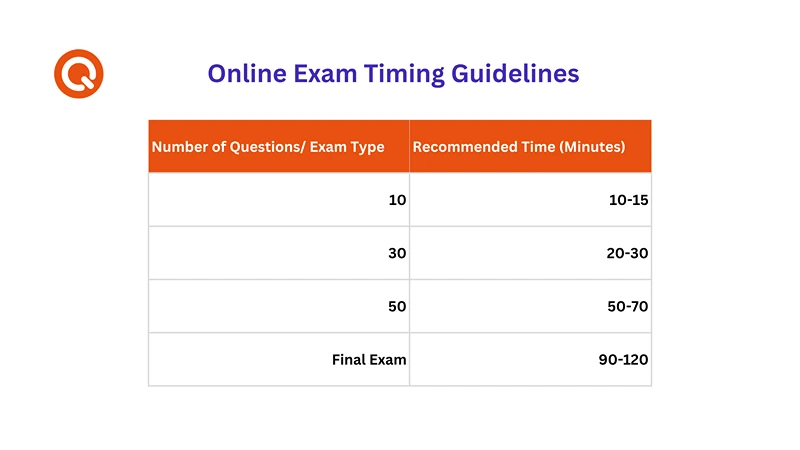
A good rule of thumb is roughly one minute per question for straightforward multiple choice, and up to 1.5 minutes per question for more complex or written answers. Always ask for feedback after your online exam or quiz so you can improve.
Read More About How Long an English Placement Should Be
What Are 3 Benefits of Adding a Timer to Your Online Exam
If you feel overwhelmed and want to stick to the basics, start with a timer on the free version. The advantages are immense, the cost is zero, and the impact is real, especially if you want to:
1. Create a Sense of Urgency and Excitement
A countdown timer motivates users to think quickly and stay focused.
2. Provide a Challenge Users Actually Want to Overcome
Timed exams make us feel competitive in the best way.
3. Improve Retention and Learning
Timed quizzes can improve knowledge retention.
Conclusion: Create a Timed Online Exam Now
Creating a timed online exam in WordPress doesn’t have to be complicated. With Quiz Maker by AYS, you can create a free timed assessment without coding knowledge. A timer is an important tool for all educators; it creates fairness, drives engagement, and encourages active thinking. Whether you are a teacher running weekly assessments, an HR manager evaluating candidates, or a course creator building a certification program, a timed exam raises the standard of your assessment. Start with the free version, set your timer, and see the difference it makes.
Download Quiz Maker by AYS for free and create your first timed online exam today.
FAQs: WordPress Exam Plugin
Quiz Maker by AYS is one of the best free quiz plugins available on WordPress. They have multiple features and are beginner-friendly for any educator to start creating online exams or quizzes today. For more advanced needs like per-question timers, email notifications, certificates, and leaderboards, you will need the pro version.
Yes, and this feature is available in the free version. The Exam Scheduling feature lets you set a From and To date for when your quiz is active. Once the end date passes, the exam automatically disappears from your site.
Yes. The free version includes a whole-exam countdown timer, which works well for most standard assessments. If you have a timer per question, you’ll need to upgrade. This is a Pro-only feature, available on the Developer and Agency plans.
This is available in the Pro version. Once enabled, Quiz Maker by AYS automatically sends an email to both the participant and the admin after each submission. The email includes the participant’s score, duration, personal details, and a full breakdown of their questions and answers.
Yes, via the Question Bank feature. You can group questions by category, and Quiz Maker by AYS will randomly serve each participant a different set of questions from those categories. This makes it much harder for participants to share answers.