If you want to create a WordPress quiz with an automatically generated certificate, Quiz Maker by AYS is one of the best plugins for the job. It supports personalized PDF certificates, customizable certificate designs, dynamic placeholders for user information, minimum passing score requirements, and automatic email delivery. In this guide, we’ll explain why Quiz Maker is a top choice for online exams, compliance training, certification programs, and educational websites, and show you how to set it up step by step.
If you run a corporate onboarding platform, an online school, or a high-traffic blog, keeping users engaged is most of the battle, and it is the exact reason why online courses have risen in popularity lately. But a quiz on its own is simply not enough to drive high completion rates because if you want your audience to take your content a lot more seriously, especially if you’re someone in the realm of online courses, LMS website owners, or training centers, you need to offer them something more tangible, like a certificate.
With this being said, WordPress doesn’t offer robust testing or PDF generation tools built into itself; you need to find ways to get around it. To find a way to deliver beautiful, automated rewards. This is exactly why we present the best WordPress quiz plugin with certificate and break them down to help you find functionality and the right match for your budget, workflow, and audience goals, as well as show you how exactly to create certificates for your website.
Why Have Certificates In Your Quiz?
When using a WordPress quiz maker certificate feature, quizzes transform from mere engagement tools into valuable assets. When there is a formal reward, it becomes a powerful reason that a lot of students, businesses, and creators alike are driven and attracted to. Here’s a detailed breakdown of those reasons.
| Benefit | Why It Matters | Best For |
| Increase Student Motivation | Gives learners a real reward, encouraging them to finish quizzes and courses. | Online courses, eLearning websites |
| Verify Training Completion | Provides documented proof that employees have completed required training or compliance programs. | Businesses, HR teams |
| Build Professional Credibility | Allows learners to show their achievements on resumes, portfolios, or LinkedIn profiles. | Certification programs, academies |
| Increase Brand Trust | Professionally branded certificates strengthen your organization’s name and leave a lasting impression. | Educational websites, coaches, training providers |
| Generate More Leads | Offering a certificate encourages visitors to complete quizzes and share their contact information. | Marketing campaigns, businesses |
| Improve User Engagement | Clear goals and rewards help reduce drop-offs. | Any website using quizzes |
Student Motivation
Everyone wants to be rewarded and recognized for the efforts that they put into self-discipline and dedication to anything, whether a student or not, which means that dropout rates can be very high. With a WordPress quiz maker certificate at the end of the course, engagement rises immediately.
To minimize that possibility, employing certificates can be a powerful psychological tool because there is a clear goal for which the students have to work. When people know that there is a personalized certificate waiting for them in the end, engagement rises immediately, and so do completion rates, giving them a genuine sense of accomplishment.
Employee Compliance Training
Sometimes, for businesses and corporate training programs, quizzes are not for engagement; they function as a necessity. It can be a safety protocol, annual compliance, or software onboarding where employers need absolute proof that team members understand the material. With a certificate, this headache is automatically solved. In this case, the certificate acts as an official record of completion that, for example, HR departments can rely on and make sure that the company stays compliant without manual paperwork.
Professional Certification Programs
If you are running a niche academy, regardless of your field, your students are likely looking to take the next step in their careers in advance. Using a certificate generation WordPress plugin can turn quizzes into a brand and establish you in the market. Your students can later add certificates and their credentials on LinkedIn or their resumes, and that means your platform and professional network grow with them.
Lead Generation Opportunities
We have established what opportunity certificates can make for you, but they are also used as marketing tools from the lead generation perspective. If you, as a business, put a little bit of effort into offering a high-quality quiz that tests industry knowledge, people will trade their name and email address to get their official score and certificate. You can use that zero-party data to perhaps later segment your audience and understand your demographic better, using it for marketing purposes.
What to Look for in the Apps That Offer Certification Options
For the best choice, we need to find a WordPress assessment plugin with certificates that can handle certificate requirements and fulfillments the same way. Some WordPress apps require manual work, while others can work completely automatically, which is why here are some things that a good WordPress app that offers a certification feature should check.
1. Automatic certificate generation
When searching for an online quiz with certificate WordPress plugin, ensure it offers automatic certificate generation. If you are a large-scale course creator, business owner, or training program, you do not want to spend your evenings manually typing names onto PDFs and emailing them to users. And even if you’re not a large-scale creator, doing all of that work manually is a lot of time, and ideally, it should operate automatically.
The second a user hits the “submit” button and passes the quiz, the system should offer an option, then immediately generate their personalized certificate, and it already does most of the job, which means pulling users’ data and emailing a certificate in real time.
2. Dynamic User Information
Just because it’s a certificate and it’s being sent automatically to every user with their name doesn’t mean that it’s the best WordPress quiz plugin with a certificate. To hold an actual value, a certificate must be dynamic, and personalized user information should be more than the name; you should look for apps that have text shortcodes or message variables. These things allow the app to automatically collect the data from the site and print individual details onto the final document.
3. Passing Score Requirements
Certificates lose their point and purpose if anyone can get them just by clicking through the questions. Your WordPress certificate plugin must allow for setting a strict passing threshold, just like an actual exam environment would do. A good app will allow you to set a certain amount or higher to access the certificate. You can further look for nice benefits, such as limiting quiz retakes.
4. Custom Certificates
Certificates shouldn’t be part of the app that you use, but they should be an extension of your brand. There should be a library of templates, or visual drag-and-drop filters, or ways to make the certificate feel like your brand.
5. PDF Download options
Finally, delivery, which is just as important as any other step. It should be a print-ready PDF file with a single click. This means your app should give you that option to display the download certificate button directly on the quiz results page, email the PDF automatically as an attachment, or perhaps save it straight to the user’s account dashboard for later.
| Feature | Why It Matters | Quiz Maker by AYS |
| Automatic certificate generation | Saves time by creating certificates instantly after users pass a quiz. | ✅ Yes |
| Dynamic user information | Personalizes certificates with names, scores, dates, and quiz titles using placeholders. | ✅ Yes |
| Passing score requirements | Ensures only users who meet your minimum score receive a certificate. | ✅ Yes |
| Custom certificate design | Lets you match certificates to your branding with backgrounds, fonts, and layouts. | ✅ Yes |
| PDF certificate download | Allows users to download and print professional-quality certificates. | ✅ Yes |
| Automatic email delivery | Sends certificates directly to participants’ inboxes after they pass. | ✅ Yes |
Best WordPress Quiz Plugins with Certificate
Quiz Maker
If you’re looking for the best WordPress quiz plugin with certificate based on its simplicity, professionalism, and affordability, the Quiz Maker by AYS Pro is the most obvious frontrunner. It can offer professional-level assessment features without the complicated process associated with a full learning management system. Quiz Maker offers many certificate features, but we break down a few here for you.

Key Certificate Features
Dynamic Certificate Fields
You can use message variables such as %%user_name%%, %%quiz_score%%, %%quiz_name%%, and the app automatically injects the quiz taker’s personalized data into the document the exact minute they finish. This aligns perfectly with dynamic user information and custom certifications, both of which are a necessity for the best WordPress quiz plugin with certificate.
Custom Designs
The quiz maker allows you to upload your own backgrounds; you can adjust the text alignments, tweak all the minute details, and completely match your company or branding. You’re also offered some templates if you wish to go down the quicker route.
Conditional Certificate Generation
This allows you to have total control over who actually earns the certificate. With conditional logic, such as requiring a minimum score, for example, 80% or higher, or requiring your students to pass specific question categories before they actually access the certificate.
PDF Certificates
The quiz maker allows you to use the PDF engine as well. This makes sure that users can easily click and download their certificates, which are print-ready, high-quality, and professional-looking, without any complications.
Email Automation
Once a user passes, the plugin can instantly trigger an automated email. You can customize the body text and have the personalized PDF certificate cleanly attached to the email, landing directly in the user’s inbox without you lifting a finger.
Demo

This is the English level test with a certificate for the quiz taker, which also comes with some features, including:
- Enable question bank → By Category
- Show interval message
- Send Mail To User → Send Results to User
- Send Mail To User → Send Interval message to User
- MailChimp
- Leaderboard for this Quiz
How to create a certificate with Quiz Maker
To make things a lot easier for you, here are step-by-step instructions with which you can create a test with a certificate using Quiz Maker, the app that is the most adaptable, rich with a lot of features, affordable, and easily accessible for all types of quizzes and tests.
Step 1 – Install and Set Up the Quiz Maker Plugin
You can search for “Quiz Maker” in the “Plugins” tab in the left sidebar menu. Then install and activate it.
Step 2 – Create Your Quiz With the Quiz Maker Plugin
This is the English level test with a certificate for the quiz taker, which also comes with some features, including:
- Enable question bank → By Category
- Show interval message
- Send Mail To User → Send Results to User
- Send Mail To User → Send Interval message to User
- MailChimp
- Leaderboard for this Quiz
How to create a certificate with Quiz Maker
To make things a lot easier for you, here are step-by-step instructions with which you can create a test with a certificate using Quiz Maker, the app that is the most adaptable, rich with a lot of features, affordable, and easily accessible for all types of quizzes and tests.
Step 1 – Install and Set Up the Quiz Maker Plugin
You can search for “Quiz Maker” in the “Plugins” tab in the left sidebar menu. Then install and activate it.
Step 2 – Create Your Quiz With the Quiz Maker Plugin
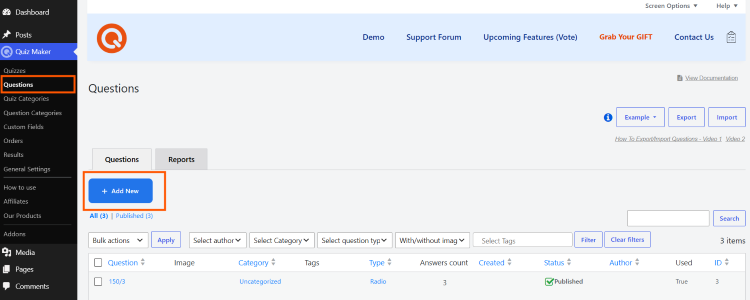
2.1 To create your own quiz with the Quiz Maker app, first, you have to create questions for your exam. Head to “Questions” and then click “Add New” and build your question bank for the test using different question types as well as assigning points, marking correct answers, and including media.
2.2 Then you have to insert these questions into the actual test. For that, just go to “Quizzes” and click “Add New” to create your first exam. Here is where you can personalize the test itself, so take your time with it and customize it to your liking.
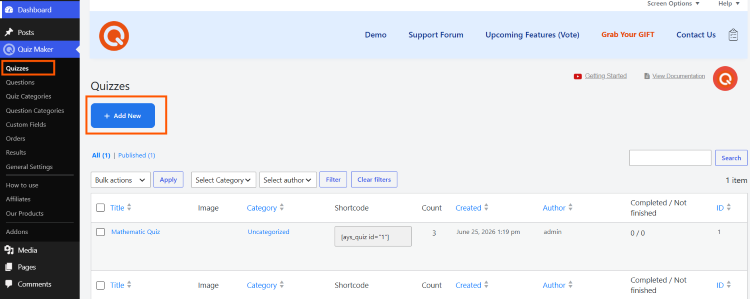
Once you’re done with everything, scroll to the bottom and click “Insert questions”, choosing the questions that you created before, and click “Insert questions” to fully integrate them into your test.
Step 3 – Create the Certificate
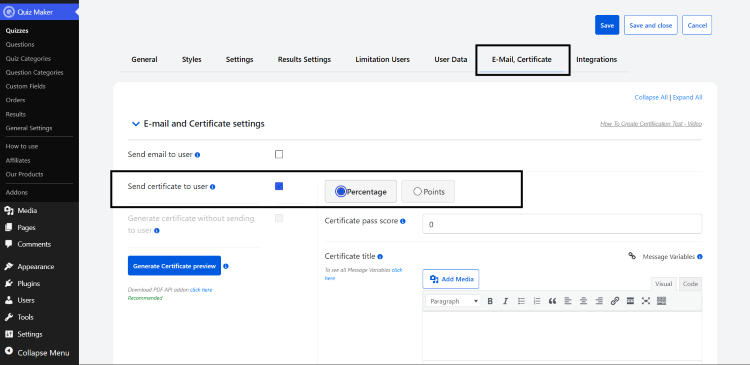
First, go to the “E-Mail, Certificate” section of your quiz and select the “Send certificate to user” option. This sends a PDF certificate to the user once they submit the quiz. The choices available, “Percentage” and “Points,” decide the content displayed on the PDF based on the selected option. Once you check the box, these fields will become visible.
Customize the Certificate
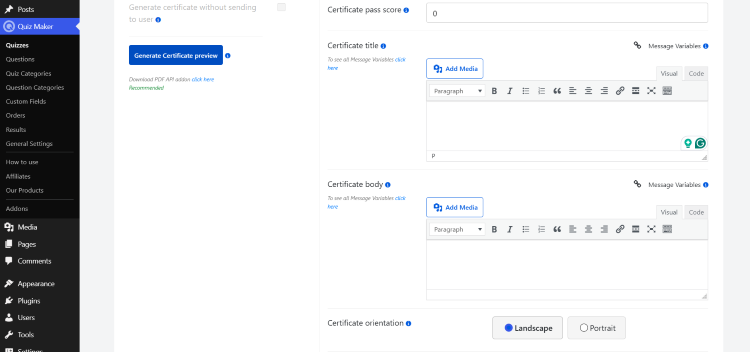
There are a number of settings you can configure in order to customize the certificate perfectly to your liking.
Pass score – allows you to set up a score that acts as a requirement to get before the actual certification.
Certificate title – you can title your certificate and also customize its font color, etc and many more.
Body – this is the most important part of the certificate. This is where you include the main information, and to automate that process, there are message variables available. You can insert those if you want to include the user’s name, the date, quiz score, etc. Custom messages are a great way to learn how to create a simple test with advanced functionality and make it more engaging.
Certificate orientation – Quite self-explanatory; you just choose whether you want the portrait or landscape layout.
Background image – you can specify the image of the certificate in the PDF file.
Frame – adds borders to your certificate and makes it visually engaging, and there are so many options you can choose from in the catalog of the Quiz Maker. You also have the option to just not choose anything.
Generate Preview – When you click the “generate certificate preview” button at the bottom, you’ll see the “Open certificate” button appear. Clicking this will open a new tab in your browser displaying a downloadable PDF file that presents the final design of the certificate.
At the very bottom, you will find the email settings to configure. You can specify the sender’s name, add a subject line, etc. Then, if you enable the “Send email to admin” box, the app sends an email containing the quiz results to the admin email address set in WordPress General Settings. You can customize this email the same way you customized the one sent to the user.
Step 4 – User Information
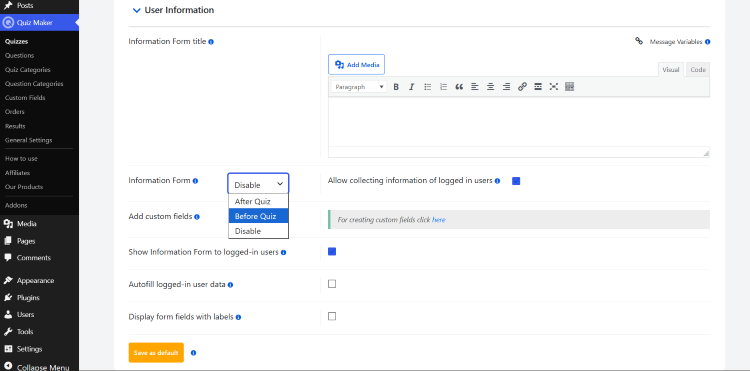
Finally, user information can be accessed in the “User Data” section. This is great for video party data and lead generation. You can tick the “Allow collecting information of logged-in users” box, and you can enable it when the information form appears before or after the quiz, and many more.
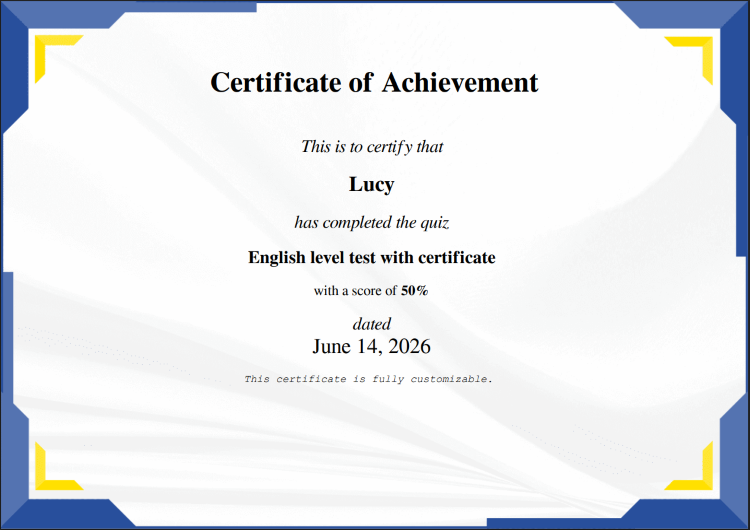
Make sure to save all the work, and that’s it! After completing the test, this is approximately what your final result should look like.
If you’re interested, here’s a more detailed guide on how to create a quiz with a certificate on Quiz Maker. Make sure to save all the work, and that’s it! After completing the test, this is approximately what your final result should look like.
Conclusion
Choosing the right plugin for an online quiz with a certificate on WordPress can significantly boost user engagement and satisfaction. Offering a tangible, professional motivation with the best WordPress quiz plugin with certificate transforms a simple, interactive quiz into a high-value asset that rewards students, automates corporate compliance workflows, elevates professional academies, and captures high-quality leads for your business.
Because WordPress doesn’t feature these capabilities out of the box, selecting the right tool for your specific workflow is key. Investing in a suitable plugin to create certificates after a quiz in WordPress helps not only in retaining your audience but also enhances their overall experience.