Creating an IQ test in WordPress can be easy and straightforward only in one scenario – if you choose the right WordPress quiz plugin.
Quiz Maker by AYS lets you create a complete online IQ test in WordPress with all the necessary features, such as timed questions, automatic scoring, personalized results, randomized questions, and much more. All of this you can achieve without writing any code or having prior knowledge of quiz plugins.
By shaping this article, we have one main goal: to cover all the points that let you know how to correctly tailor your IQ assessment online, how the point system works to create an IQ test in WordPress, and how to show the IQ score, all with Quiz Maker by AYS.
Maybe you want to entertain your blog visitors, maybe you’re building a fun lead magnet for your business, or maybe you’re an educator looking for a quick way to test your students. Whatever your reason is, by the end of this article you’ll have a fully working IQ test on your WordPress site.
So, let’s get started and see how Quiz Maker by AYS makes it happen.
What Is an IQ Test and Your Site Needs One?
In simple words an IQ test evaluates human intelligence in areas such as logic, memory and problem-solving skills.
The main purpose of an IQ test is to measure a person’s potential to learn, solve problems and adapt, rather than just test their knowledge.
IQ tests are mostly used on psychological, educational, career/HR, and hobby websites to evaluate thinking skills.
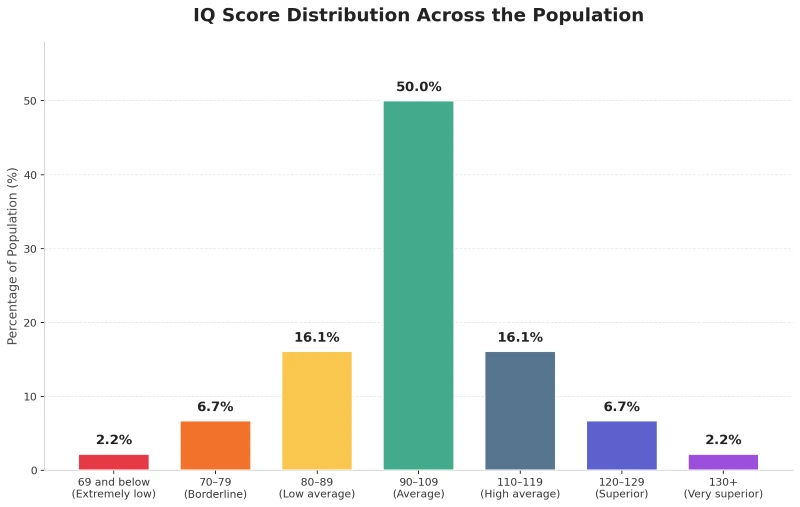
The average IQ score is 100. Any score that is higher than 100 indicates high IQ, and a score below 100 indicates low IQ.
Here’s how IQ scores break down across the general population:
Below you can see the types of sites using IQ tests on their websites.
- Lead generation and marketing sites: Bloggers, tutors, and digital marketers use IQ quizzes on their websites as lead generation tools to capture visitor emails in exchange for personalized results.
- Career/HR sites: Recruiters use IQ tests to evaluate problem-solving skills and fast learning ability during the hiring process.
- Educational websites: Many e-learning platforms use IQ tests to assess student growth, identify learning needs, and recommend the most appropriate programs to students.
Now, let’s also see why you should have an online IQ test on your website.
- Email collection: As your website visitors want to see their results immediately, they are highly willing to spend time on the page and submit their email address. As a result, both you collect their emails and increase the time spent on your website.
- Lead generation and audience understanding: By using IQ tests you can have a better understanding of what interests and motivates your audience. Analyse the outcomes of the quizzes and user feedbacks and segment your visitors, personalize your follow-up emails, etc.
- Traffic and SEO increase: As users are interested in finding out how intelligent they are, using an online IQ test on your website can bring you search engine traffic
- Social networking opportunity: It is fun to post your scores online or tell your friends about them. As a result, you will get some referral traffic from other sites. Also, engaged visitors will probably check out more of your webpages or even buy your products or services.
How to Create Online IQ Test With Quiz Maker by AYS
Now comes the most exciting part of our article where you learn what Quiz Maker by AYS can do for your WordPress IQ Quiz.
Let me quickly introduce Quiz Maker by AYS to you.
So, Quiz Maker by AYS provides a free plan that offers all the necessary options to create a simple IQ test, such as unlimited number of quizzes and questions, automatic scoring, timers, question randomization, results pages, and customization of quiz templates.
Nonetheless, in case you require more complex features like collecting user data, email marketing integrations, certificates, leaderboards, and reporting, you should turn your attention to the PRO version of Quiz Maker by AYS.
Let’s start building your online IQ test with our WordPress quiz plugin.
Step 1: Install and Activate Quiz Maker by AYS
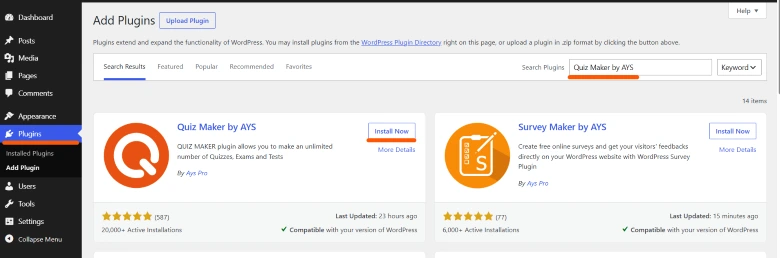
- Go to the Plugins tab and search Quiz Maker by AYS.
- Click the Install Now button, then activate it.
After taking these steps, Quiz Maker by AYS icon will appear on the left sidebar menu.
Step 2. Create Your IQ Test Questions
- Go to the Questions tab, and click the Add New button.
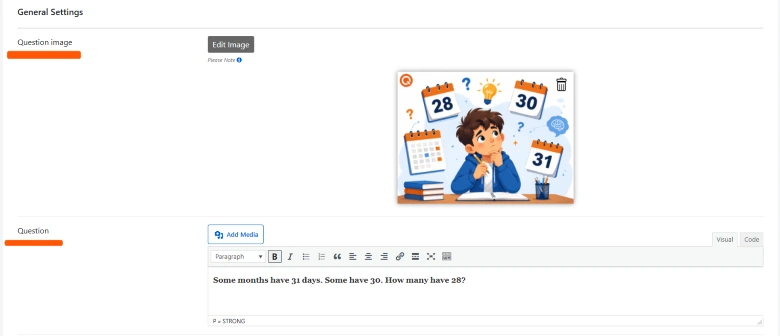
- Here you add a question image (optional) and insert the IQ question one by one.
- Then you choose the question type
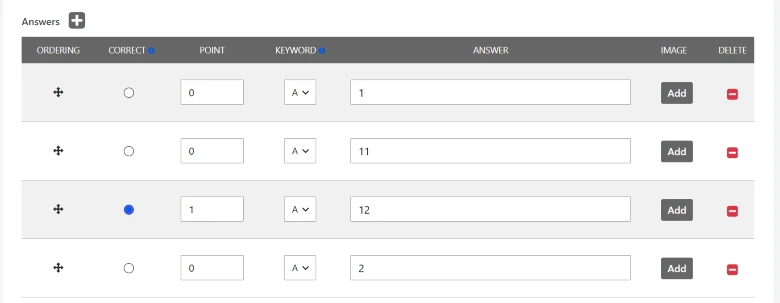
- Lastly, you enter the answer options and tick the correct one, and save the question.
Step 3. Create a New Quiz
After having created all the IQ questions one by one, we go to the Quizzes tab from the left sidebar menu.
- Click the Add New button.
- Then enter the IQ quiz title, insert a quiz image (optional), and write the quiz description.
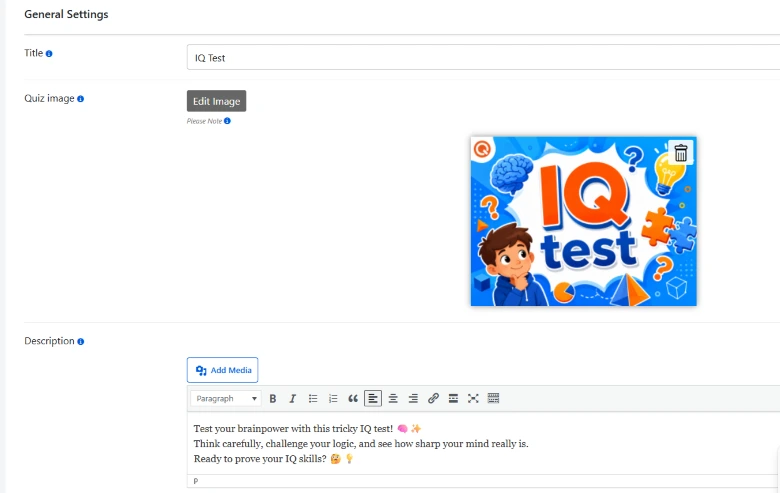
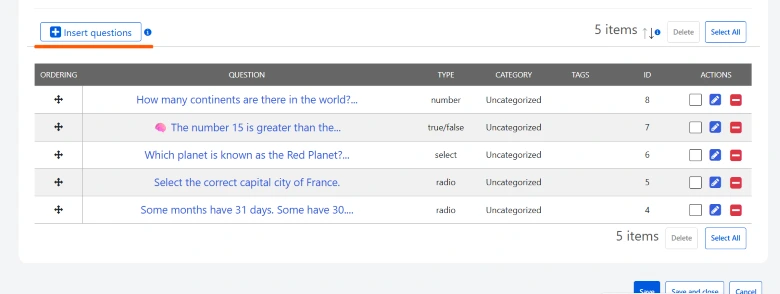
- After that, you need to click the Insert Questions button, and insert the already created questions into the quiz.
- Then click the Save button.
Step 4. Customize the Quiz Design
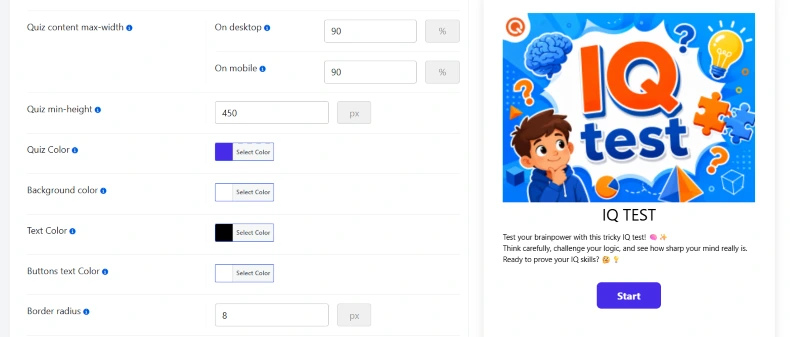
In the Styles tab, you will find more than 70 customization options for your WordPress IQ quiz. You can adjust colors to match your website’s interface, choose from 6+ ready-made themes, customize buttons and layouts, set a custom background color or image, and even apply custom CSS for advanced design customization.
Step 5. Configure the Quiz Settings
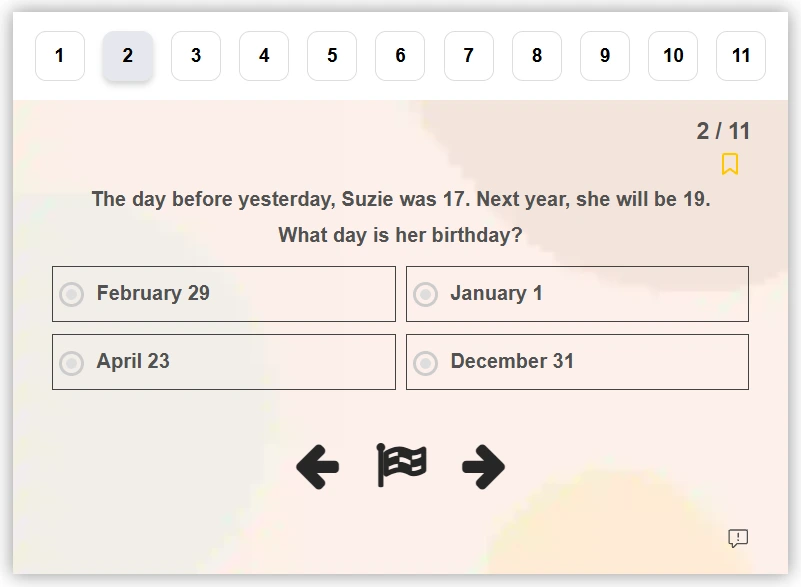
The Settings tab of Quiz Maker by AYS will make your WordPress IQ test functional at its best. Here, you can enable a quiz/question timer, add a navigation bar, randomize questions and answers, configure action buttons, and adjust many other settings to create a more engaging and professional testing experience.
For IQ tests in particular, we recommend enabling:
- Question and answer randomization
- Time limits
- Question navigation controls
- Question marking for reviewing questions later
- Question reporting for reporting unclear questions
Step 6. Configure the Results Settings
- After configuring quiz settings, go to the Results Settings tab and choose how the quiz score will be calculated (by correctness or by weight / points)
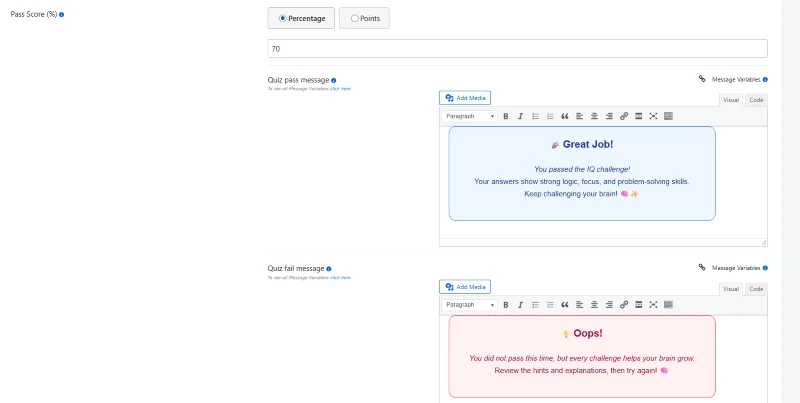
- Set a Pass Score, and add personalized result messages for users who pass or fail the IQ test.
- Then, enable the display score option, show question results on the results page, and enable the progress bar.
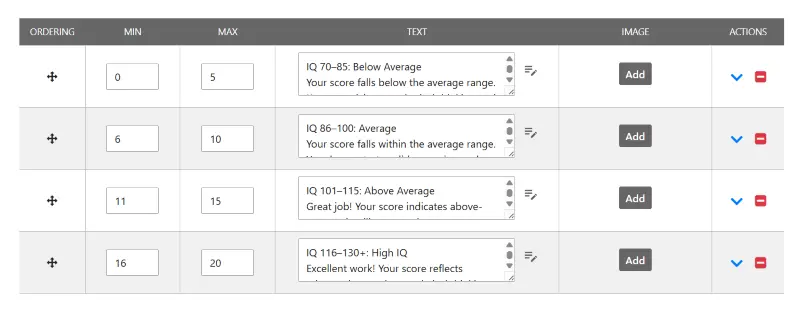
- After that, configure the score intervals to display different result messages based on users’ performance.
- Lastly, save the settings and preview your IQ test results.
You can calculate the score based on the number of correct answers and define custom IQ ranges with the Intervals feature.
For example:
0 – 5 correct answers = IQ 70 – 85
6 – 10 correct answers = IQ 86 – 100
11 – 15 correct answers = IQ 101 – 115
16 – 20 correct answers = IQ 116 – 130
Step 7. Publish the IQ Test on Your Website
Now, it’s high time to display the IQ quiz on your website so your users can take the quiz and receive their results.
So, to do that:
- Copy the shortcode of your IQ test.
- Open the page / post where you want to display the IQ assessment.
- Paste the shortcode into the WordPress editor.
- Publish or update the page to make your IQ test live.
As you can see, these are the essential steps required to create a fully functional IQ assessment on your WordPress website using Quiz Maker by AYS.
To make the process even easier for you, we’ve also prepared a collection of 50 ready-to-use IQ questions that you can download and import into Quiz Maker by AYS.
In the file we have included all the question types that Quiz Maker by AYS supports.
This way, you don’t have to spend hours creating IQ questions from scratch. We’ve already done the hard work for you, so you can focus on launching your IQ test faster.
The only thing you have to do is to download the Simple XLSX file and import it in Quiz Maker by AYS.
IQ Test Examples and Ideas
If you are not sure what type of IQ test to create, don’t worry. There is no single correct format.
Depending on your goals and audience you can build different types of IQ assessments with Quiz Maker by AYS.
Some examples include the following:
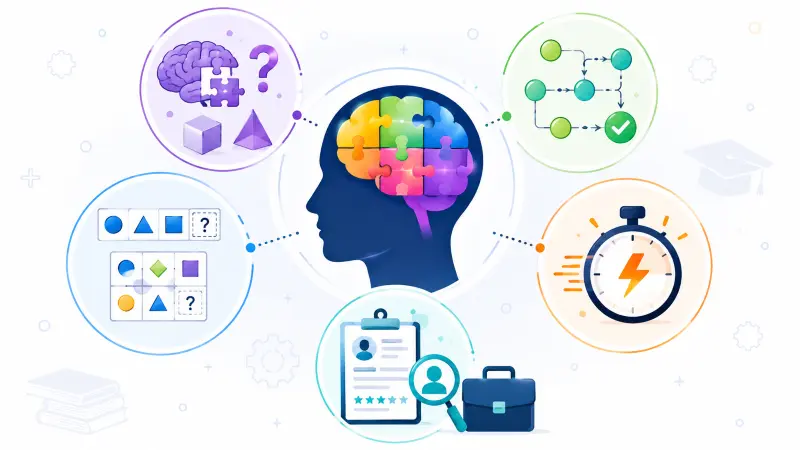
General Intelligence Test
This test determines your intelligence in the aspects of thinking skills, problem solving, pattern recognition, and visual perception of information. It evaluates your general intelligence and reasoning skills.
Logical Reasoning Test
This test determines how good you are at solving problems, thinking and reasoning critically and identifying patterns and rules. It evaluates your analytical and logical skills, and not background knowledge, to find the right solution to a question.
Pattern Recognition Test
This test determines how well you are able to recognize patterns and rules in symbols and shapes or numbers.
Quick IQ Challenge
This is a quick assessment of your problem solving and logical skills.
Recruitment IQ Assessment
This is the test that determines logical thinking, quick learning, and decision-making skills of the candidates. It is used by employers to gauge the aptitude of an individual for a particular position.
Summing Up
As you can see, creating an online IQ test in WordPress is not complicated and time consuming.
With Quiz Maker by AYS, you can create your own IQ assessment, customize its design, configure scoring and results, and publish it on your website in just a few steps.
In order to simplify the process even more, we’ve created a set of IQ questions ready for you to use that can be easily imported to Quiz Maker by AYS and allow you to create your quiz right away.
Now you try! Build your own IQ test using Quiz Maker by AYS and tailor it to your needs so that your users can challenge themselves in logical reasoning.
Interested in watching the whole process? Check out our video tutorial on how to create IQ tests in WordPress, and don’t forget to subscribe to our YouTube channel for more WordPress quiz tutorials and tips.