If you’re looking for the best WordPress quiz plugin for exams, Quiz Maker by AYS is the strongest option available. It combines advanced exam features such as time limits, question randomization, question banks, pass/fail conditions, detailed reporting, attempt restrictions, and user authentication into a single platform that runs directly inside WordPress.
Unlike basic quiz builders designed for lead generation or engagement, Quiz Maker’s exam features make it the top choice for a WordPress exam plugin used in educational testing, employee training, certification programs, recruitment exams, and compliance evaluations. It helps maintain exam integrity, automate grading, reduce administrative workload, and deliver a professional testing experience for both instructors and candidates.
In this article, we’ll explore the features that make Quiz Maker the best WordPress quiz plugin for exams, and show you the steps to create an online exam in WordPress.
Quizzes and Online Exams: What’s the difference?
When choosing the right online exam plugin for WordPress, it’s crucial to understand the differences between quizzes and exams. A lot of the time, people can make the mistake and use the words “quiz” and “exam” interchangeably. If you are a marketer trying to generate leads, a quick and light-hearted quiz is perfect.
This usually works for engagement, and it’s a great way to get to know your audience. But if you’re an educational institution, HR manager, or perhaps training organization, you don’t need lead generation because you’re dealing with high-stakes evaluations. And they’re sending this, which is very important when it comes to choosing the right WordPress exam plugin for your website. So let’s quickly break down the characteristics of a quiz and an online exam.
Quiz Characteristics
First, quizzes’ whole purpose is to be approachable, shareable, interactive, and even viral. They are tools to capture attention and increase engagement, and not provide deep or professional academic evaluations. They are very engagement-focused and use vibrant visuals, gamified mechanics, and instant feedback to keep users clicking.
Second, it is also marketing-focused. Most standard WordPress quiz plugins are engineered for lead generation. They are built to capture an email address and exchange for fun results, and that can be seen in BuzzFeed-style quizzes or personality tests.
And the last characteristic of a quiz is that they are usually quite short. They’re short because online quizzes are designed to prevent user drop off, and these quizzes rarely exceed 5 to 10 straightforward questions, and it’s very rare that they also require critical thinking or time investment.
Exam Characteristics
Online examinations are a lot more formal, structured, and fully created for serious kinds of evaluations. Their entire purpose is to measure competency, compliance, and to protect the integrity of a certification program.
Time Restrictions
Unlike casual quizzes, which you can walk away from, exams use Global or per-question timers to prevent cheating and measure processing speed.
Scoring Rules
Secondly, online exams also come with Advanced scoring rules. These exams require complex grading mechanics such as negative marking for wrong answers, weighted question points based on difficulty, and partial credit logic.
Pass or Fail Logic
Thirdly, online exams rely on pass or fail logic. It is not uncommon to encounter online examinations that rely on conditional outcomes that automatically branch the user to a specific past or fail destination.
Analytics
Next is reporting and analytics because online exam data goes far beyond a final score. Professional systems generate deep reporting breakdowns detailing time spent per question, perhaps averages of the students, and also question vulnerability metrics to help the instructors change their program, perhaps.
Security Control
And finally, security control is essential. When searching for an assessment plugin for WordPress, look for apps that have strict cheating mechanisms to ensure validity. Disabling copy/paste, randomizing question banks so that two students do not receive the same test, or employing browser lock warnings and restrictions are essential elements for anyone using a WordPress exam plugin to conduct online examinations.
To provide you with a better understanding when searching for an assessment plugin for WordPress, here’s a skimmable comparison table for you.
| Aspect | Quizzes | Online Exams |
| Purpose | Practice & knowledge check | Formal assessment & grading |
| Question scope | Topic-specific, narrow | Broad, course-wide |
| Time settings | Flexible or short | Fixed and strictly timed |
| Attempts | Multiple or unlimited | Usually, a single attempt |
| Grading style | Often automated, immediate feedback | Automated or instructor-reviewed |
| Data use | Used for learning analytics & progress tracking | Used for final performance evaluation |
| Security level | Low to moderate | High (proctoring, monitoring tools) |
| Lead generation/engagement use | Often used in marketing funnels, LMS engagement, or onboarding flows | Rarely used for lead generation; mainly for institutional assessment |
| Integration role | Lightweight integration into LMS or websites | Deep integration with LMS, exam platforms, and credential systems |
Best WordPress Quiz Plugin for Exams
Quiz Maker by AYS is a WordPress Exam Builder Plugin as well, and it is arguably the most feature-rich option available in the market regarding online examinations. Unlike basic form builders that simply record answers, this WordPress quiz plugin for assessments is a powerhouse because it offers deep configuration settings specifically engineered to secure test integrity, automate complex evaluation criteria, and handle massive volumes of test takers natively within your online examination system WordPress dashboard. Here are seven reasons why Quiz Maker is the best option available for professional online examinations.
Time Limits
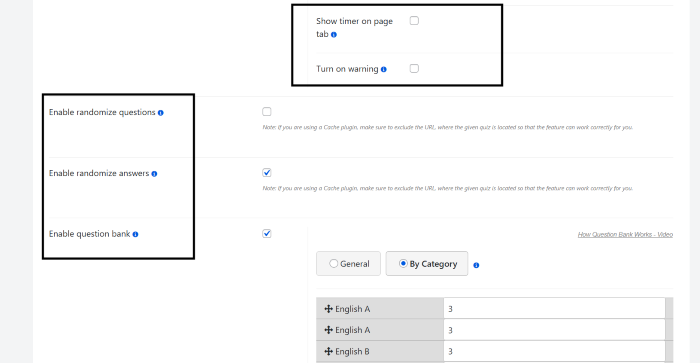
We mentioned the importance of time or restricted time for a good WordPress exam plugin, and it is critical for preventing cheating. As a top-rated WordPress testing plugin, Quiz Maker offers advanced timer features like countdowns that force submission the exact second the timer expires. You can also set a macro timer for questions, for example, giving a candidate exactly 60 seconds to answer your complex problem before the system automatically locks the answer and pushes them to the next question.

Advanced Question Randomization
If every candidate receives the exact same questions in the same order, exam integrity is compromised immediately. This WordPress quiz plugin for assessments completely gets rid of this problem. It allows you to scramble and shuffle both the question order and the multiple-choice answers for every individual user session. Even if two students take the exam side-by-side, their screens will look completely different.
Question Banks
Quiz Maker is the ultimate online exam plugin for WordPress. It offers advanced exam features such as time limits and question banks. The Question Bank feature allows you to take a random set of questions from a larger pool to keep quizzes fresh and unpredictable. You can either show a specified number of questions from all questions or from a specific category.
Pass or Fail Conditions
Again, we mentioned how this is a critical feature of an online exam. Quiz Maker allows you to define a precise passing point. You can set up either by point value or score percentage. There’s also a conditional score interval, meaning that depending on whether the user passes or fails, you can set strict conditional actions.
For example, if you want to create an exam with a certificate, passing candidates can be instantly redirected to a custom success page with a certificate. At the same time, the failing candidates can receive a different message detailing their mistakes or pointing them to review material.
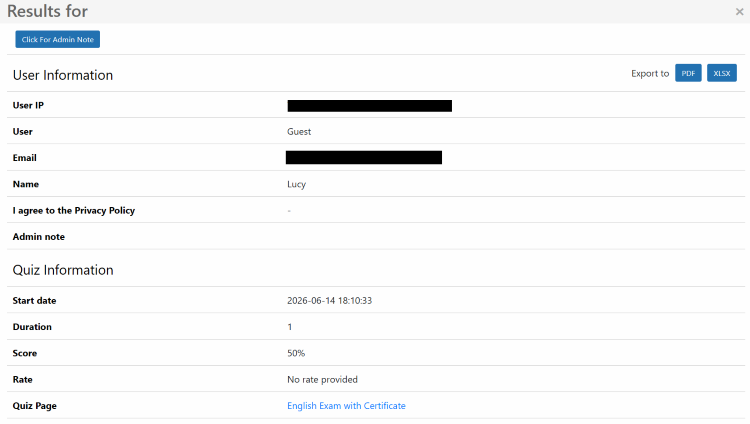
Detailed Reporting
As a highly used WordPress testing plugin, Quiz Maker’s data collection goes beyond logging a pass or fail. This WordPress exam software compiles deep analytics, complete with a breakdown. Instructors and HR managers can track the exact start and end times for each user down to the specific second, categorizing performance.
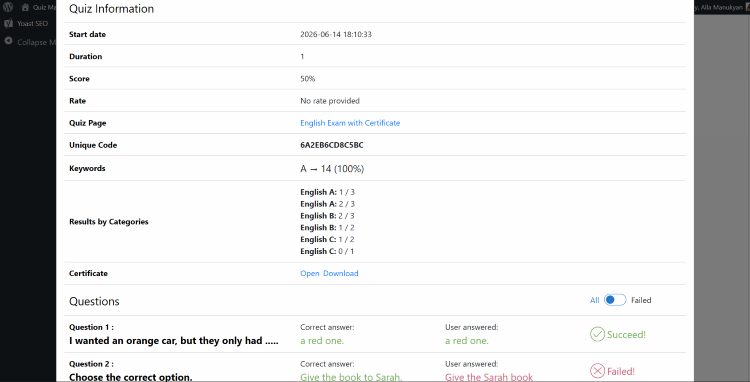
For example, you can track if an employee passed overall but failed the “data security” subcategory. And of course, front and error mapping, which shows exactly which questions are frequently answered incorrectly by your student body.
Attempt restrictions
Attempt restrictions are important to prevent users from repeatedly guessing until they pass. Quiz Maker gives you complete authority over this retake threshold. You can set a specific maximum exam attempt generally.
User Authentification
For high-stakes recruitment assessment or certification programs, knowing exactly who is taking the test is mandatory. There are multiple access controls that Quiz Maker offers, such as:
- Logged-in restrictions: You can restrict exams entirely to registered WordPress users, such as subscribers, students, or customers
- Custom data forms: for public-facing tests, you can deploy front-end data capture forms before the exam begins to clarify and verify user data by requiring their names, phone numbers, or emails.
More features in Quiz Maker make it ideal for institutions that cannot afford weak grading systems or compromised data evaluations. If your workflow demands secure question polls, anti-cheating protocols that are strict and automated conditional outcomes, Quiz Maker is the best choice. It’s a fully realized standalone examination platform.
How to Create an Exam with Quiz Maker?
To explain how you can create an exam with the best WordPress quiz plugin for exams, we can take a look at the Quiz Maker demo English Level Test with Certificate.

Step 1 – Create the Exam Profile
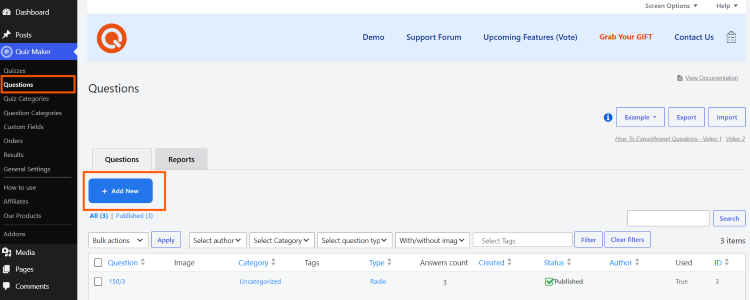
1.1 First, after downloading and activating Quiz Maker, you need to create questions for your exam. For that, navigate to the “Questions” section on the left side bar menu and click “Add New” to create questions.
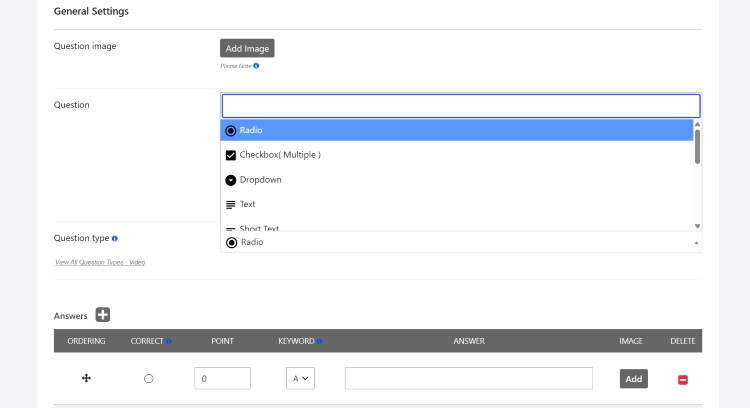
In the “General Settings” page, you can configure the title of the question, the question type, weight category, correct answers, and more. Scroll down and click “Save”.
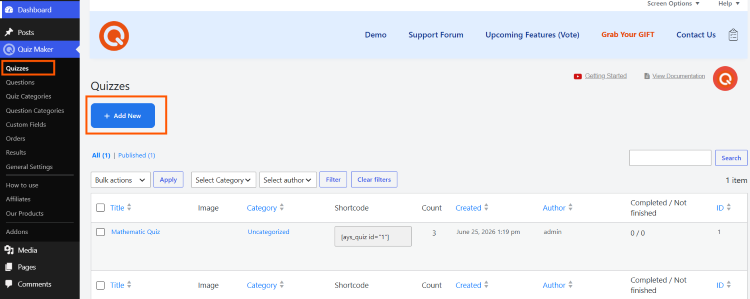
1.2 After yoy created all the necessary questions, create your exam. Go to the “Quizzes” section on the left sidebar menu and click “Add New”.
1.3 After you create the quiz, give it a title and a detailed description, customize it with images if you want, add a certain category etc.
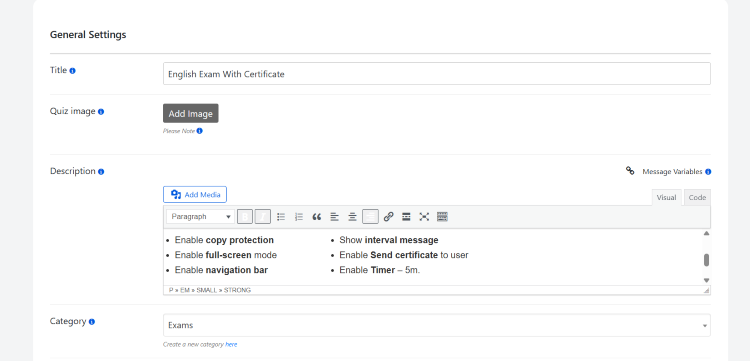
1.3 In “Settings” tab, you can add a duration by enabling the timer.
Step 2 – Configure the Assessment Settungs
2.1 In the “Advanced Settings” section of “General Settings,” you can find progress tracking bar that provides a cue for the test taker. It shows exactly how far they’re into the 14-question sequence (1/14).

2.3 In the “Answer Settings” you can configure setting to provide immediate feedback and verification, instant scoring. This is a critical feature for self-paced learning or practice exams, letting users learn from their mistakes in real time.
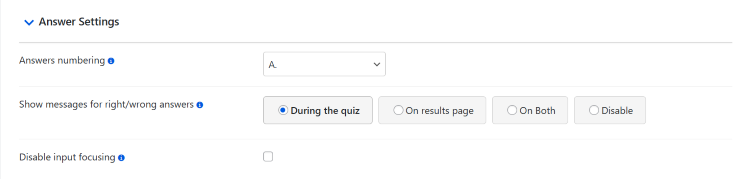
It’s important to know that this doesn’t always have to be the case because, in other examples, like a TOEFL mock exam, there are questions that simply cannot be given instant feedback, which is why you can collect these answer records and look at them personally before finally assessing them.
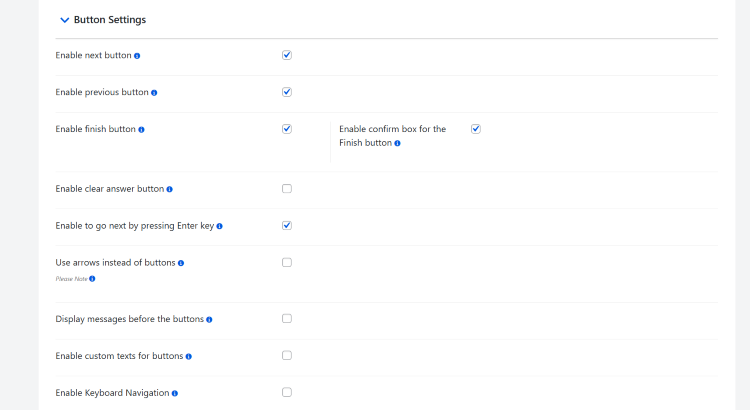
2.4 Finally you can also access the “Button Settings” to add “finish” and “next” button strategically. In a high security exam, you can actually hide the next button until the question is answered or disable the finish button until the minimum time has passed.
Step – Pre-Results Page
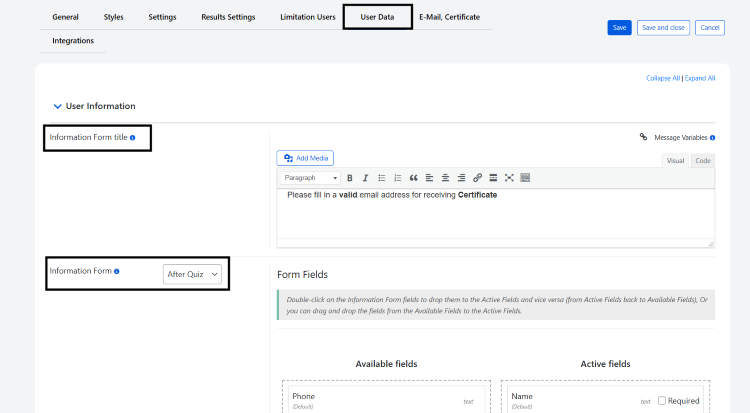
Right before clicking to see results, the students or exam takers are prompted to fill out their name and email address. This makes sure that even during a time of high-pressure evaluation, you can capture accurate identity records for your certification database or even recruitment pipeline.
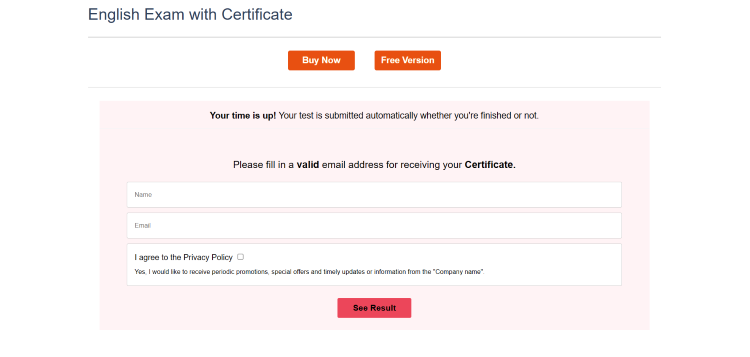
3.1 To accesses that head to the “User Data” tab, and you’ll see the user information section. You can give it a title and decide when this form pops up (before or after the exam).The submission form includes a built-in privacy policy check, making sure your training evaluations and online exam for WordPress remain fully compliant with protection before users can click the result.
4. Create the Results Page and Certificate
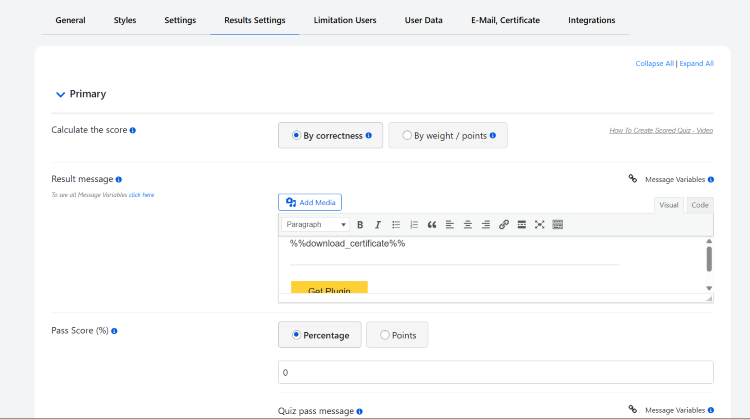
4.1 And the result page is the last step that you need to set up. In Quiz Maker, go to “Results Settings,” and you can configure how decide how it calculates the score, write the result messages both for pass and fail, decide how the pass score shows up, and more.
Certificates in exams are crucial not only for students but also for you as an educator who is willing to establish their credibility in the market.
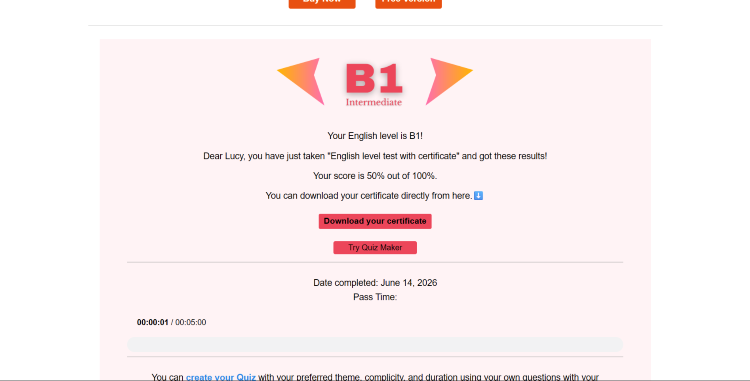
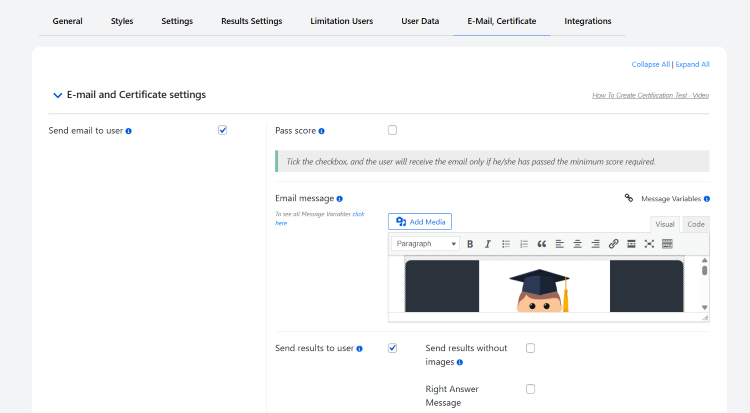
4.2 To add a certificate to your exam. Head to the “Email, Certificate” tab and customize your certificates accordingly by design and with message variables for personalization. If you want to learn about certificates in exams, follow this guide.
Conclusion
The shift toward digital isn’t just about moving paper tests online; it’s about building a self-sustaining ecosystem that respects both the educator’s time and the learner’s achievements. By transitioning from basic forms to an exam-grade engine like Quiz Maker that is ideal for use as an exam maker WordPress plugin, you eliminate the administrative friction of manual grading, security monitoring, and certificate delivery.
This automation allows your organization to scale seamlessly, whether you are certifying a dozen new corporate hires or testing thousands of students globally. Ultimately, investing in a robust testing infrastructure protects your institutional credibility, turns data into actionable insights, and gives learners a frictionless path to proving their expertise.