If you’re a company that gets visitors and users from different countries, you probably have already translated all your pages and menus, but there is also another important thing: the quizzes. A WordPress multilingual quiz lets every visitor of the website take part in their own language; this applies whether it’s a knowledge test, personality test, or an exam.
This guide will help you build a multilingual quiz using the Quiz Maker plugin by AYS. It will also explain why these quizzes matter and how to keep the translations organized.
Main takeaways
- Why multilingual quizzes are useful for reaching people globally
- What tools you need: WordPress, Quiz Maker, and (if you want) a translation plugin
- How to translate a quiz step by step, from the shortcode to publishing it
- Simple tips for managing multilingual
- Why choose Quiz Maker by AYS
A quiz is usually a good way to keep the visitor interested. A quiz feels very personal and interactive. It feels as if someone truly wants to learn more about you. Also, most people get very excited to see the quiz results at the end. Imagine your brand is a brand and you have visitors who speak Spanish, Russian, or French. When the quiz is in English, the quiz becomes a problem for those visitors. The quiz will make visitors leave the quiz. May cause them to stop visiting the website because the quiz is not clear to them.
This might sound a bit technical. You do not need to hire a developer to do this. You can use WordPress plugins to get the job done in a few easy steps. You will not need to write any code. You will not have to rebuild your quizzes for each language.
Why create a multilingual quiz?
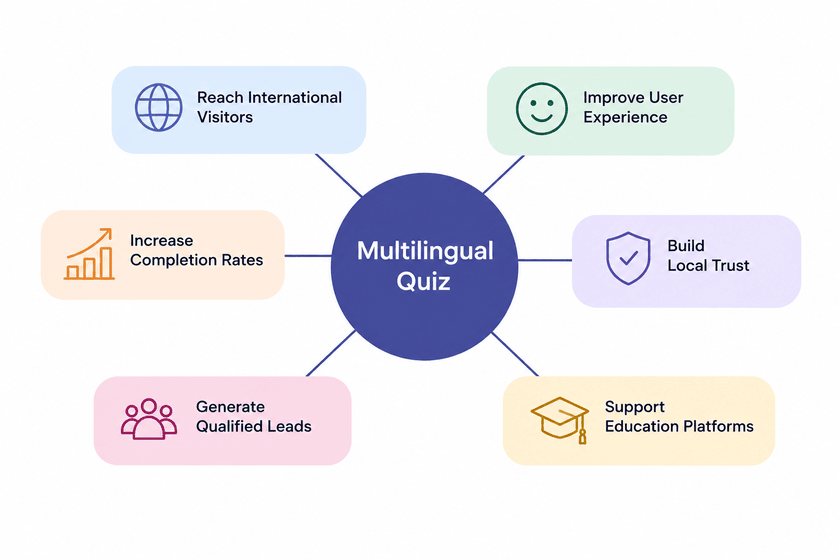
A multilingual online quiz is not just an extra nice thing to have; it does really change how people experience your website. How does it help?
Reach an international audience – If you’re an international company, and you know your website is being accessed from different countries, by people with different cultural backgrounds, an English-only quiz will definitely stop them.
Improve user experience – This one is very basic; reading a question in your own language feels easier and closer to you. Reading it in a second or third language takes more time and effort, and obviously, a quiz should feel easy and fun, and not something that would consume energy from you.
Increase quiz completion rates – When one sees their own native language on an international website, it motivates them to reach the end. People are more likely to quit a quiz and not finish it if they don’t understand a specific question. This specifically happens when the language is their second or third language.
Build trust with local audiences – Having the same content in different languages, so it’s accessible for everyone, shows that the company cares about their market and audience.
Generate more qualified leads – If you have your quiz, and the goal is to collect leads, for instance, ” Which product is the right choice for you?”, a language barrier at the beginning means that fewer people will finish the form, and this means you’ll have fewer good and qualified leads at the end.
Support multilingual educational platforms – Especially for online courses, tutoring sites, or certification programs, a multilingual online quiz lets you have the same test for students in different languages, without having to create separate content for each language.
Altogether, all these benefits support each other and make the user’s experience so much better and more enjoyable.
What you need before you start
There are a few things you should have ready first:
- A WordPress website – all of the below-mentioned points are going to happen inside the WordPress dashboard, so this is a must
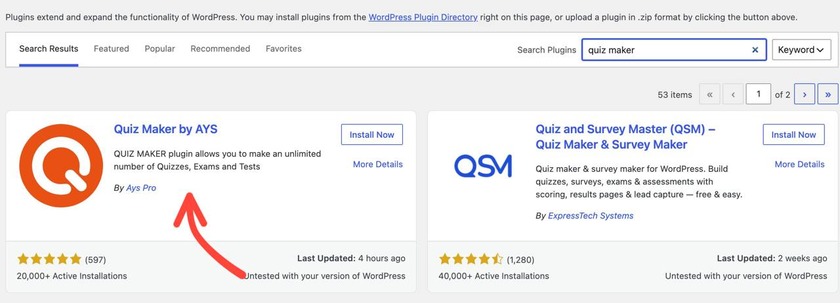
- The Quiz Maker plugin – Quiz Maker by AYS is one of the most popular quiz plugins, and we are going to use that in this guide. You can easily download the plugin by going to the Plugins section on your left sidebar and clicking Add Plugin.
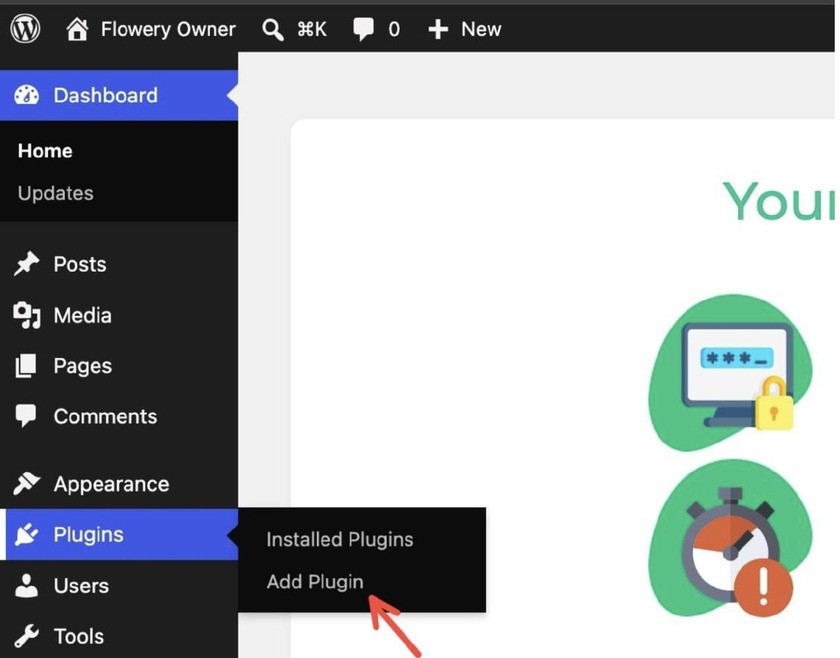
Once the whole menu of plugins opens, you can search for the specific plugin you want to download and activate; in our case, it’s the Quiz Maker by AYS. You now know how to click Install Now and then easily activate the plugin․
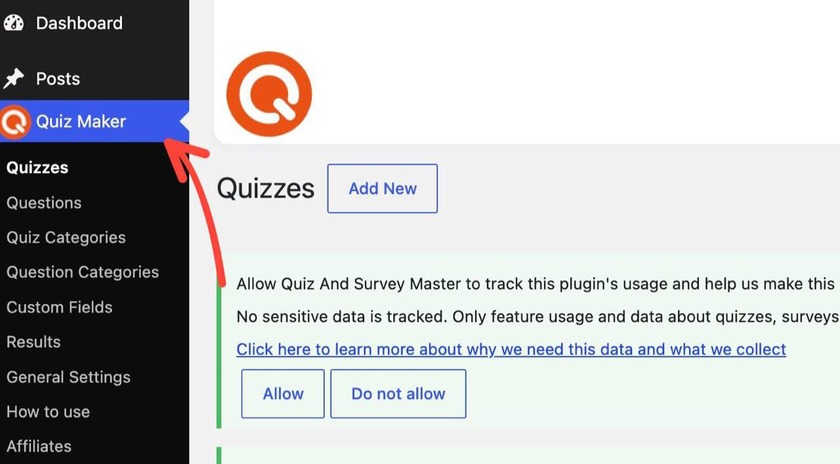
Once it’s active, Quiz Maker will be right on your left sidebar
- You will also need to have a plugin that supports languages like WPML or Polylang. If your website already uses WPML or Polylang to handle translated pages, then you are in a good position because Quiz Maker by AYS works with both of these plugins. (If you’d rather use WPML instead of Polylang, here’s a guide on translating Quiz Maker with WPML.)
- And the last thing you need is the already prepared quiz translations. Before you open the dashboard, have your questions, answers, and quiz title translated to your desired language, and have them ready to copy.
Now you have the four main things you need; you can begin to build the quiz.
How to Create a Multilingual Quiz in WordPress with Quiz Maker by AYS
Quiz Maker has a built-in shortcode system made for this; it lets you translate WordPress quizzes without creating a new quiz for each language separately. For a visual video guide, you can also watch this video on YouTube, or check out this article.
Step 1: Download a Multilingual Plugin (WPML or Polylang)
Firstly, you need to set up a multilingual plugin; we’re going to use the Polylang one, but there are many more to choose from. So, as we did previously while adding the Quiz Maker by AYS plugin, in the same way, here we go to Plugins, click Add New, and search for Polylang. Once you install and activate it, you will see this window appear on the screen.
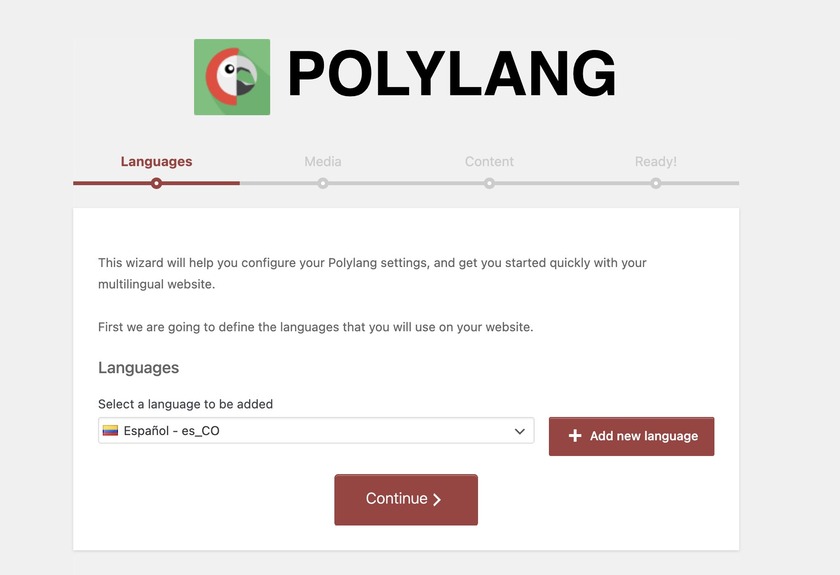
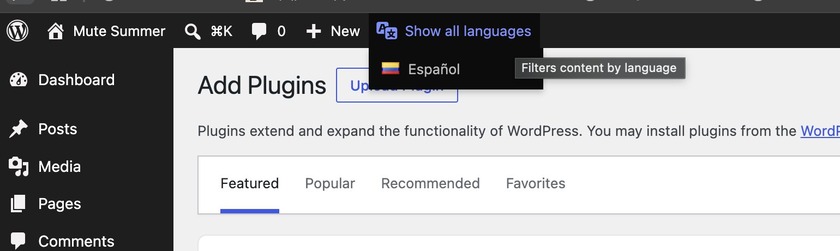
In this tab, you can click Add New Language and add as many languages as you want. As you can see, Spanish is already added. Once you click Continue and refresh your window, you’ll see this language menu on your screen.
Step 2: Find the Multilanguage Shortcode
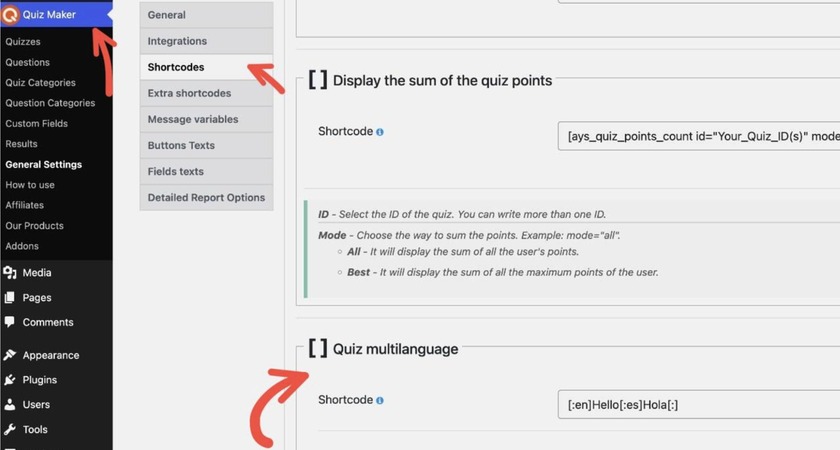
In your WordPress dashboard, open the Quiz Maker plugin from the left sidebar, then go to General Settings, then click Shortcodes. Scroll down until you find the “Quiz multilanguage” box. This shortcode is the base for everything else in this guide.
Step 3: Memorize the Shortcode Structure
The shortcode follows a simple pattern. You put a language code inside brackets, then you add the text for that language. You just repeat this for every language you want to add. Then you finish the whole thing with [:]. For example, if you look at the picture, you will see the shortcode looks like [:en]Hello[:es]Hola[:]. In this example, en is the language code, and es is the Spanish language code. I should mention that you cannot change anything on this shortcode page. This shortcode page is here to show you how the shortcode should look.
Step 4: Translate your questions and answers
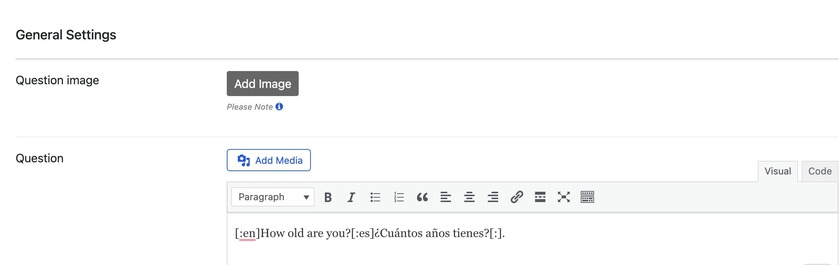
Now you should go to the Quiz maker menu, click Questions, and add a new. Once you open it, in the question box, you should paste the shortcode you have with your desired language codes in it, and just edit the text in there; you can see an example below. And do the same thing with the answers as well.
Step 5: Now you’re almost done with everything. You just have to create a new quiz, add your questions in there, and publish your quiz.
A Few Tips Before You Publish
- Check translations carefully – before you publish your quiz, carefully check the translations, as even a small mistake might confuse the users.
- Keep questions short and simple – long and complicated sentences would be harder to translate well, and harder to read on a phone
- Pick the languages your visitors actually use – do analytics on your site, and see where your audience is mainly from.
Why Choose Quiz Maker by AYS for Multilingual Quizzes?
There are several plugins to use, but Quiz Maker by AYS stands out for multilingual quizzes because of its features.
Easy quiz creation – the dashboard is pretty easy to learn and use, and you need 0 coding skills to make quizzes
Multiple quiz types – You can use the same multianguage shortcode for various quizzes, can be knowledge tests, personality quizzes, and everything.
Advanced customization – you can change the layout, colors, fonts, and question order/logic so it matches your brand and each audience.
Certificates – Quiz maker by AYS lets you send people a certificate after they finish the quiz. This is a very useful tool, especially for schools and online training programs.
Email automation – you can send results or follow-up emails automatically, in the same language the quiz was taken in.
Conditional results – you can show different results depending on how someone answered, which works well for personality and recommendation quizzes.
Lead generation integrations – Create leads from the quiz and link them to the marketing tools you already have. These integrations help you get leads, from the quiz
User-friendly interface – both the admin dashboard and the quiz itself are easy to use.
Compatibility with popular multilingual plugins – This compatibility works with WPML and Polylang for sites that already manage multiple languages.
No coding required – everything above, including translation, can be done from the dashboard.
Building this quiz on WordPress may sound technical and difficult. As you go deeper, you notice that it is really just a few steps. First, download a plugin, like Polylang. Then,. Remember the shortcode. Next, translate your questions and answers. Finally, insert the shortcode into the question box. After you have completed all these steps, your site visitors will be able to take this quiz in their language. Quiz Maker by AYS makes this whole process pretty easy, as everything happens inside the dashboard, and no coding knowledge is needed. Besides the multilanguage feature, it also comes with certificates, email automation, and lead generation tools that can help you create a better experience for users.
If yoy haven’t tried the quiz maker yet, then now is a good time to start. Try Quiz Maker by AYS, and build your very first timed online exam.